


26Migration from label software: zplCore Capture
zplCore Capture is a Windows app that turns labels from NiceLabel, BarTender, TEKLYNX and other Windows label programs into zplCore JSON templates: fields bound to your data, native barcodes, placement as printed. It reads only the print job that your program sends to the printer “zplCore Capture” – never the label files of the program. zplCore Capture is not available for download; we provide it on request: contact us. Overview with screenshots: label migration.
1. Set up the capture printer (once)
- In the app, under step 1, click “Set up capture printer” and confirm the Windows prompt (administrator rights).
- This creates the printer “zplCore Capture” (driver Generic / Text Only, EMF spooling, keep printed documents). It prints nothing on paper but keeps the print jobs. Do not make it the default printer.
2. Create the placeholder copy of the data source
- If the data comes from an Excel or CSV file: choose “Placeholder copy of the data source” and select the file. Next to the original you get
*_placeholders.xlsx/.csv,*_codes.jsonand*_records.json; the original stays unchanged. - In the copy, the first record holds a short code instead of each value:
XQ04for texts,Q07for short values, numbers of the same length for number fields (so GS1 check digits stay valid and the program still prints the barcode). - Values typed in at print time (input form, prompt)? Then you need no file: for the second print, type a code of your own instead of each value and put the assignment into a
codes.json({"XQ01": "field name", …}).
3. Print the label twice
- Data print: open the label in your program (don't change it), choose “zplCore Capture” as the printer, quantity 1, and print the first record of the original data source (or real sample values). If the program asks about adjustments for the new printer, keep the label size and positions.
- Placeholder print: switch the data source to the placeholder copy (or type the codes into the form) and print again on “zplCore Capture”, first record, quantity 1. Then switch the data source back to the original.
- In the app, under step 2, click “Get newest” (administrator rights): the older job becomes the data print, the newer one the placeholder print.
The app's built-in guide has the steps per program: NiceLabel / Loftware (tested with NiceLabel 10 on 18 sample labels), BarTender, TEKLYNX CODESOFT, LABELVIEW and LABEL MATRIX (not tested yet, same procedure) and other programs. ZebraDesigner and programs that only print to their own printer models: print to a file with a Zebra driver and use the ZPL import.
4. Optional: preview picture
Under “Codes, test data, preview”, add a picture of the label at label size (the program's own preview as PNG, a screenshot or a scan). The label origin is then found exactly, single texts move to where the preview shows them, and the comparison shows the real print.
5. Convert and check the result
- Enter the label size in mm and the printer dpi and click “Convert”. Text recognition and the barcode check take a few seconds.
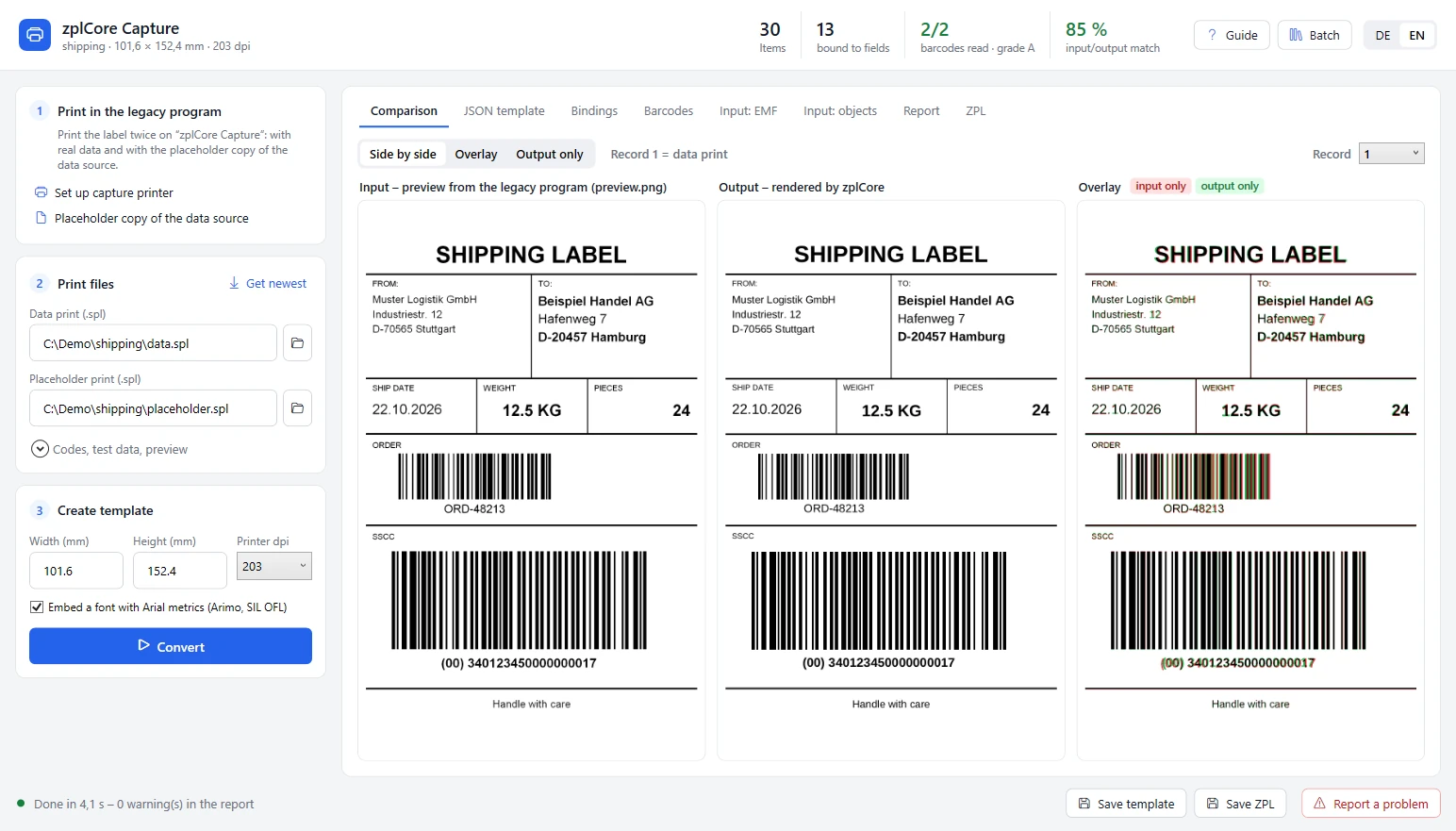
- Comparison: red = only in the input, green = only in the zplCore result; “Overlay” shows differences most clearly. The header shows items, bound fields, barcodes read with their grade and the match of input and output.
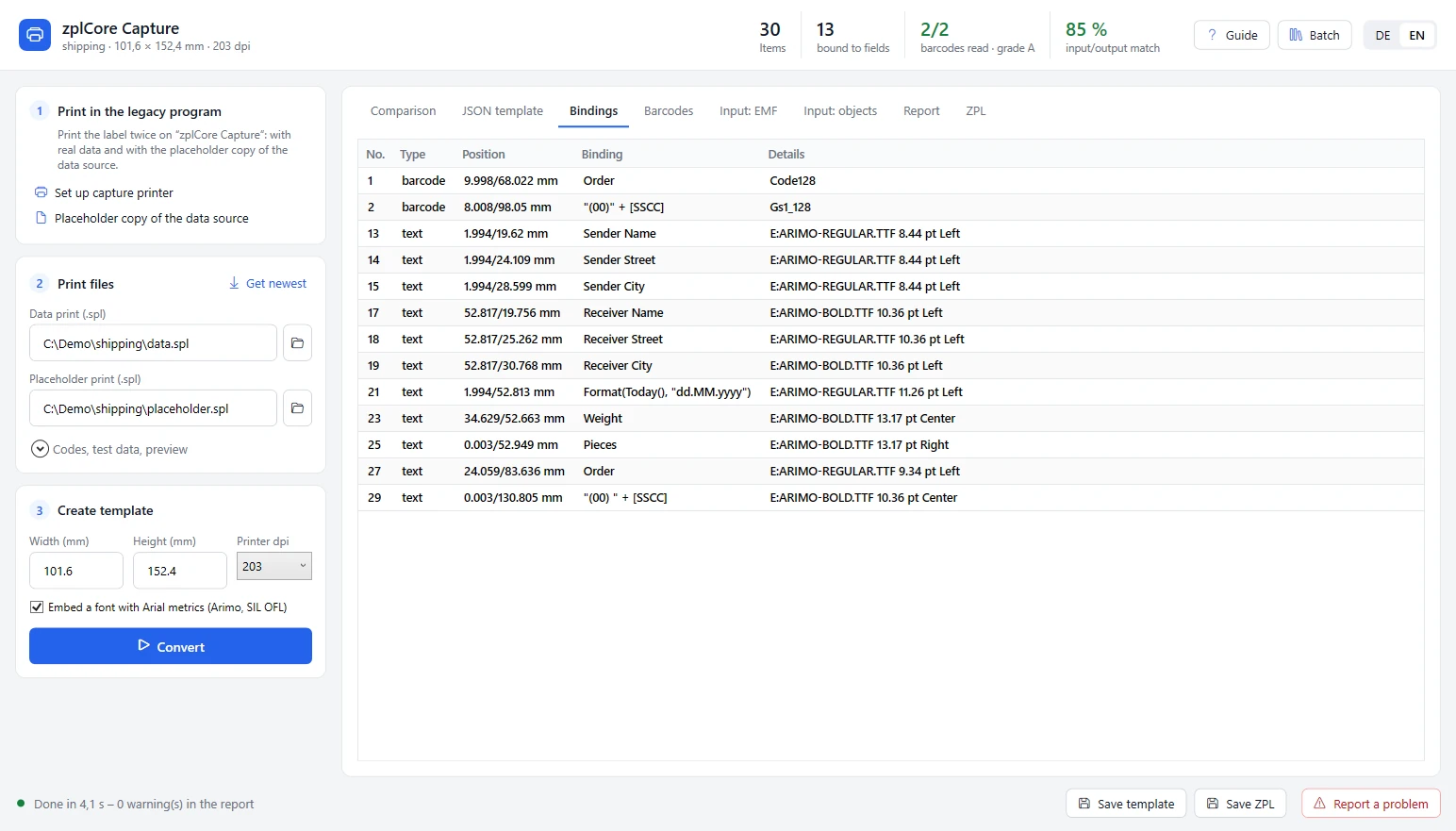
- Bindings: which item is bound to which field or expression. Dates automatically become relative to the print date.
- Batch: convert a folder with one subfolder per captured label (data print, placeholder print, codes, test data, preview) at once.
Comparison
Bindings
6. Use the template
“Save template” gives the JSON template, “Save ZPL” printer-ready ZPL. The template loads in the label model and in zplCloud:
var label = Label.FromJson(File.ReadAllText("label.json"), strict: true);
string zpl = label.ToZpl(records, dpi: 300);   // bound fields are filled from your data
Typical problems
| Problem | What to do |
|---|---|
| The program reports “invalid value” or “does not fit” for the placeholder print | The label checks that field (format, length, check digit). Keep the original value for this field: it is taken over as fixed text and can be bound later. |
| “Get newest” takes the wrong jobs | Make both prints right after each other and don't print other jobs on “zplCore Capture” in between. |
| Texts look spaced out or overlapping in “Input: EMF” | Normal: the Generic / Text Only driver forces fixed character widths. Content, font and position are still complete. |
| A field is not bound | Check that codes.json and the test data belong to the prints. Fields filled by script or formula become fixed text or a recognised part (Left/Mid); serial numbers and counters become fixed values – add them as counters in the template. |
| Different font than in the original | Printer fonts (e.g. Zebra fonts of the driver) don't exist on the capture printer and are replaced by a Windows font. Size and position are right; change the font in the template if needed. |
| Barcode grade D or F | Often already in the original, e.g. a quiet zone that is too narrow – compare with the original print. |
| Label offset or items slightly misplaced | Add a preview picture at label size (step 4). |
| The capture printer can't be chosen | Programs that only print to Zebra drivers or their own printer models: print to a file with a Zebra driver and use the ZPL import. |
| Setting up the printer or “Get newest” fails | Both need administrator rights; confirm the Windows prompt. |
| TEKLYNX: label tied to the capture printer | Choose the original printer again after the test before you save – or don't save the label at all. |
Still not right? “Report a problem” builds a ticket with images, template and ZPL and opens it as an e-mail draft – nothing is sent until you click Send. The spool files contain the printed label data; only attach them if this data may be passed on.
NiceLabel, Loftware, BarTender, TEKLYNX, CODESOFT, LABELVIEW, LABEL MATRIX and ZebraDesigner are trademarks of their respective owners and are named only to describe compatibility. zplCore Capture never opens, decrypts or rebuilds the files of a label program.