


27Testing+, zplcore check & GitHub Action
Labels are code – test them like code. ZplCore.Testing asserts what a label prints, not only how it looks: every barcode is read back with two decoders and every element is measured. When something fails, the message names the element, its position (dots, mm, ZPL line) and an image with the element outlined. Works with xUnit, NUnit, MSTest and any other runner.
dotnet add reference src/ZplCore.Testing/ZplCore.Testing.csproj
// using ZplCore.Compliance; using ZplCore.Testing;

ZplAssert.Label(zpl)
    .HasLabels(1)
    .NoOverlaps()
    .NoClipping()
    .Complies(CompliancePacks.Gs1LogisticLabel)
    .Barcode("SSCC").Decodes("(00)376104250021234569").HasGrade(atLeast: 'B').HasQuietZones()
    .And.Text("RETAIL DC").IsWithinLabel().DoesNotOverlap("SSCC")
    .And.FitsPrinter(ZplCore.Twin.PrinterProfiles.Get("ZD421d-203"))
    .MatchesSnapshot("pallet");          // pixels + semantics, approve with ZPLCORE_ACCEPT_SNAPSHOTS=1
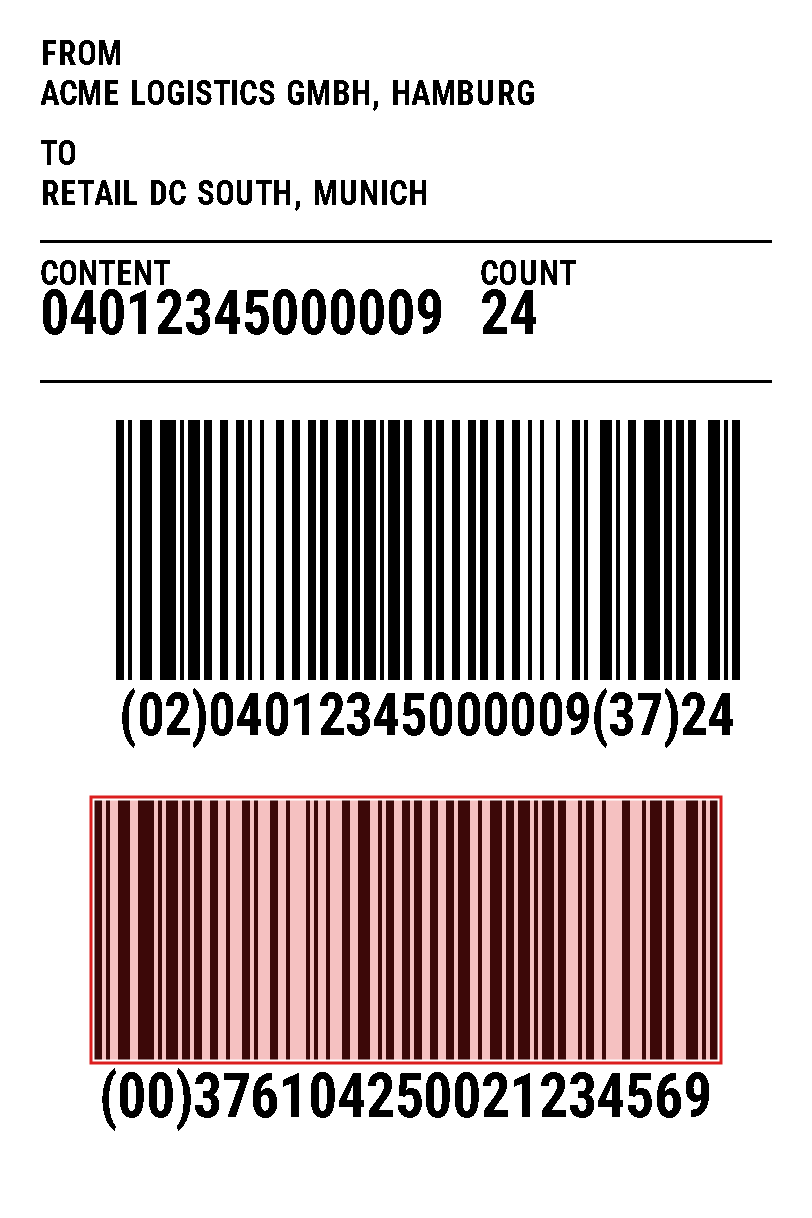
Failure message with image
What you can assert
HasLabels,Renders,NoOverlaps(real ink, frames do not count),NoClippingComplies(CompliancePacks…),AllBarcodesDecode(),AllBarcodesHaveGrade('C')Barcode("SSCC"):Decodes,HasGrade,HasQuietZones,HasXDimension,IsGs1Text("…"):IsWithinLabel,DoesNotOverlap,IsAbove/IsBelow,HasCharHeightFitsPrinter(PrinterProfile)with the printer twin,FieldEquals("FN1", …)MatchesSnapshot: pixels and semantics – a failing snapshot says what changed ("text moved by +12 dots")
Label(zpl).Barcode("SSCC").Decodes("(00)376104250021234576") failed: the decoders read "(00)376104250021234569", expected "(00)376104250021234576".
  element     ^BC Code128 "(00)376104250021234569" at x=94 y=800 (11.8 / 100.1 mm), 624 × 260 dots (78.1 × 32.5 mm) · line 17, col 1
  source      ^FO94,800^BCN,260,Y,N,N,D^FD(00)376104250021234569^FS
  decoders    zxing-cpp: "(00)376104250021234569" · ZXing.Net: "(00)376104250021234569"
CI without a test project: zplcore check
The same checks over many files: render, layout, compliance packs, scan-proof, printer profile, snapshots and a comparison with the base branch – output as text, JUnit XML, SARIF, JSON, Markdown (for PR comments) or GitHub annotations. Exit codes 0/1/2.
zplcore check "labels/**/*.zpl" --pack gs1-logistic --verify --min-grade C --layout --printer ZD421d-203
zplcore check labels/ --snapshots tests/__snapshots__ --format junit -o labels.junit.xml
zplcore check labels/ --baseline base/ --report-dir report/ --format markdown -o report.md   # before/after/diff PNGs
zplcore snapshot accept tests/__snapshots__
GitHub Action
The composite action tools/github-action checks the label files changed by every pull request against the base branch and writes annotations, a job summary, one updated PR comment with before/after/diff images and SARIF for code scanning. It ships with zplCore; publishing it to the Marketplace as zplcore/label-check is planned. Until then, copy the folder into your repository and let it install the CLI from your package feed.
name: Label check
on:
  pull_request:
    paths: ["**/*.zpl", "**/*.json"]
permissions:
  contents: read
  pull-requests: write     # PR comment
  security-events: write   # SARIF → code scanning
jobs:
  labels:
    runs-on: ubuntu-latest
    steps:
      - uses: actions/checkout@v4
      - uses: ./.github/actions/label-check          # copy of tools/github-action
        with:
          packs: gs1-logistic
          min-grade: C
          nuget-source: https://nuget.example.com/v3/index.json   # feed with the ZplCore.Cli package
The grade is a digital pre-check modelled on ISO/IEC 15415/15416, not an ISO verification; compliance packs are pre-checks, not certifications. Pull requests from forks without write access get annotations and the job summary, but no comment and no SARIF upload.
Gates in CI and in the container build
A broken template that reaches production gets expensive: barcodes that do not scan at the dock, lines that stop, shipments the carrier rejects. The same checks therefore run wherever a template changes – in the commit, in the pull request, in the pipeline and in the container build – and decide deterministically: same template, same result, exit code 0 or 1.
CI gate (any pipeline)
# exit code 1 on errors, reports for the pipeline
zplcore check templates/ --pack gs1-logistic \
  --verify --min-grade B --printer ZD421d-203 \
  --junit out/labels.junit.xml --sarif out/labels.sarif
Also in Azure DevOps, GitLab CI or Jenkins: CLI, exit codes and JUnit XML.
Gate in the container build
# build stage: check the templates before an image is built
FROM mcr.microsoft.com/dotnet/sdk:10.0 AS label-gate
WORKDIR /src
COPY nuget.config ./
COPY .config/ .config/
COPY templates/ templates/
RUN dotnet tool restore \
 && dotnet zplcore check templates/ --pack gs1-logistic \
    --verify --min-grade B --printer ZD421d-203
FROM mcr.microsoft.com/dotnet/aspnet:10.0
# only checked templates end up in the image
COPY --from=label-gate /src/templates /app/templates
What a stopped gate looks like (real output, shortened):
PASS  templates/dhl-100x150.zpl
FAIL  templates/express-100x150.zpl
  FAIL comply gs1-logistic
    :38:1  error ZPL3104  X-dimension 0.375 mm < 0.495 mm
    :38:1  error ZPL3105  bar height 13.0 mm < 31.75 mm
  FAIL scan-proof
    :32:1  error ZT1301   QR Code grade D, required B
  ok   printer ZD421d (ZD421d-203)
FAILED (fail-on error) · exit 1
Cuts and RFID in the gate. A small change to ^MM or ^PQ suddenly cuts every label or none; a fixed ^RF writes the same EPC to every copy. Both usually show up only on the line – in the gate they are settled beforehand (rule ZPL3909: the same EPC on several labels; ZPL3904: EPC does not match the barcode).
# CI: RFID pack in the gate, show the EPC per label
zplcore check templates/ --pack gs1-logistic,rfid
zplcore rfid simulate templates/palette.zpl
# staging: simulate a printer with cutter and RFID
zplcore serve --profile ZT411-203 --option cutter,rfid --rfid --cut-marks
// cuts: where the cutter cuts
var plan = ZplCutPlan.Analyze(zpl);
Assert.Equal([2, 5], plan.CutAfter);            // after labels 3 and 6
// RFID: EPC matches the barcode, no duplicate EPC
ZplAssert.Label(zpl)
    .Complies(CompliancePacks.Rfid)
    .FitsPrinter(PrinterProfiles.Get("ZT411-203").WithOptions(PrinterOption.Cutter | PrinterOption.Rfid).AsPrinterFit());
Explained by AI, approved by people. A coding agent (Claude Code, GitHub Copilot, Cursor) checks changes through zplcore-mcp (comply, verify, printer_check, render, diff), explains the findings and proposes the fix as a commit. Approval stays with you, e.g. with required reviewers for label changes through CODEOWNERS and branch protection.