


22Chaos printer & cutter simulation
Tests whether your print application copes with real failures – without hardware. ZplVirtualPrinter behaves like a network printer that fails on purpose: paper or ribbon out, head open, over temperature, pause, buffer full, cutter fault, RFID void, disconnect after n bytes, latency, slow receive, partial writes, power off. Triggered immediately, after n labels/bytes/cuts, on a command, after a time or by seeded random. ~HS, ~HQES, ~HM and SGD getvar report the state like a real printer; labels wait in the buffer until the fault is cleared.
// using ZplCore.Printing;

await using var printer = new ZplVirtualPrinter(9100) { RenderSettings = new() { CutterInstalled = true } };
printer.LabelCut += (_, e) => Console.WriteLine($"{e.LabelIndex}: {e.Reason}");    // 3: PauseAndCutCount …
printer.Faults.FaultRaised += (_, e) => Console.WriteLine($"{e.Kind}: {e.Cause}");
printer.Start();

printer.Faults.Schedule(ZplFaultKind.PaperOut, ZplFaultTrigger.AfterLabels(3));        // label 4 waits
printer.Faults.Schedule(new ZplFaultRule(ZplFaultKind.Disconnect, ZplFaultTrigger.AfterBytes(1000)));
printer.Faults.Seed = 42;                                                               // reproducible random
// … your print application now sends to 127.0.0.1:9100, reads ~HS and has to recover …
printer.Faults.Clear(ZplFaultKind.PaperOut);                                            // paper loaded

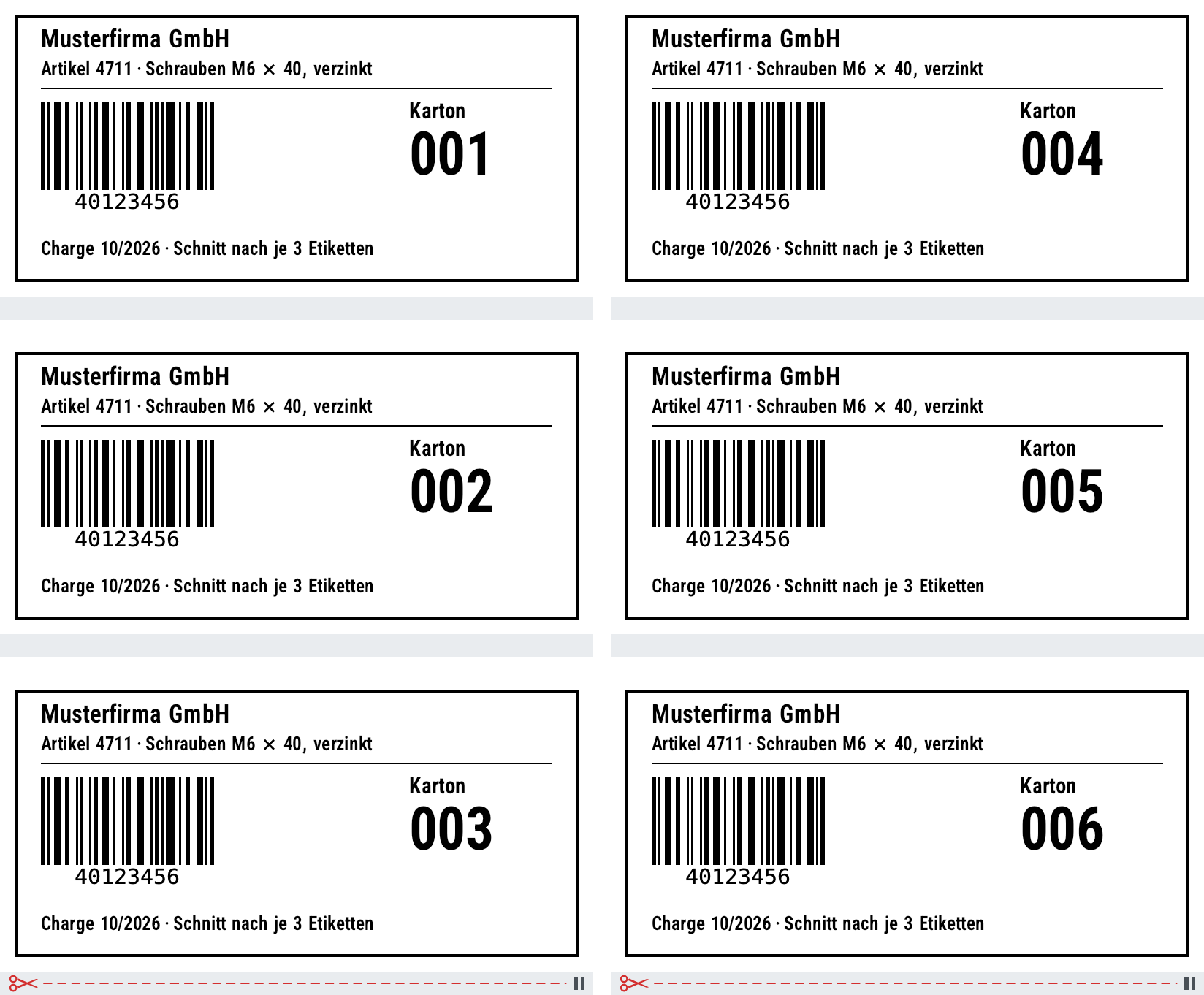
var plan = ZplCutPlan.Analyze(zpl);                       // samples/zpl/cutter.zpl: ^MMC + ^PQ6,3
Console.WriteLine(string.Join(", ", plan.CutAfter));     // 2, 5 → cut after labels 3 and 6
var preview = new ZplRenderer(new ZplRenderSettings { CutMarks = true }).ProcessCommands(zpl);
zplcore serve --port 9100 --chaos chaos.json --cut-marks --out printed/
# chaos.json
{"seed":42,"printer":{"cutter":true,"labelPrintTimeMs":200},
 "faults":[{"kind":"paperOut","after":{"labels":3},"clearAfterMs":5000},
           {"kind":"latency","delayMs":300},{"kind":"disconnect","after":{"bytes":1000}}]}
Where does the cutter cut?
ZplCutPlan.Analyze or ZplRenderer.LastCutPlan tells for every label whether and why it is cut: ^MM modes including the delayed cut with ~JK and kiosk mode (^CN/^KV), the pause-and-cut value of ^PQ, ^XB, stored formats and ^SN copies; issues as ZPL4101–ZPL4105. With ZplRenderSettings.CutMarks = true, PNG, SVG and PDF get a strip below each label – a dashed cut line with scissors where the printer cuts (off by default, output otherwise unchanged).
samples/zpl/cutter.zpl: ^MMC + ^PQ6,3 – cut after labels 3 and 6
The sources are the Zebra programming guides; whatever they do not state is documented as an assumption. Not simulated: the JSON port 9200 and the single-connection port; for load tests --concurrent processes connections in parallel instead of one after the other like a printer.