04Barcode gallery
All barcode commands from ZPL – every image was rendered from real ZPL. Click “ZPL” to show the source, click the image to enlarge it. ^B7 (PDF417), ^BX (Data Matrix, pixel-identical to the reference renderings) and ^BQ (QR, module-identical to the reference renderings: mode selection, version, EC boost and mask) use their own encoders; new are ^BB Codablock F, ^B4 Code 49, ^BF MicroPDF417 and ^BZ type 3 (Intelligent Mail), as well as ^FM for Macro PDF417 (one field, multiple symbols at their own positions).
More on zplCloud.com: Guide: Barcodes in ZPL · Guide: QR codes in ZPL
Label model: symbologies without a ZPL command
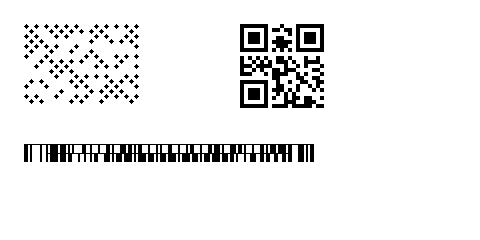
Labels.BarcodeItem additionally supports Micro QR, rMQR, GS1 QR, Swiss QR, EPC QR, GS1 Data Matrix, Aztec Rune, Han Xin, DotCode, Ultracode, Code 16K, Telepen, postal codes and much more. If ZPL has no command for it, the barcode generator renders the symbol and it is output automatically as a ^GFA graphic – correctly even with UseStoredFormat(). Codablock F, Code 49, MicroPDF417 and Intelligent Mail remain native commands.
// in the label model: symbologies without a ZPL command are emitted as ^GFA automatically
var label = new Label(LabelUnit.Mm, 60, 30)
    .Add(new BarcodeItem { X = 3, Y = 3, Code = "DotCode 42", Symbology = ZplCore.Labels.Symbology.DotCode, ModuleWidth = 5 })
    .Add(new BarcodeItem { X = 30, Y = 3, Code = "(01)09521234543213", Symbology = ZplCore.Labels.Symbology.Gs1QrCode, ModuleWidth = 4 })
    .Add(new BarcodeItem { X = 3, Y = 18, Code = "CODABLOCK", Symbology = ZplCore.Labels.Symbology.CodablockF, BarHeight = 2 }); // native: ^BB
string zpl = label.ToZpl();   // also applies with UseStoredFormat()