


11Bulk data binding
label.For<T>() returns a typed, streaming LabelBinding<T>: works with lists, LINQ, EF Core (IQueryable or AsAsyncEnumerable()), LiteDB, DataRow and dictionaries – millions of records without holding them in memory.
var binding = label.For<OrderRec>()
    .Map("Total", o => o.Price * o.Quantity)    // computed field (compiled lambda)
    .Copies(o => o.Quantity)                    // ^PQ per record
    .UseStoredFormat();                         // ^DF once, then only ^XF + ^FN values

// DataField = "Customer.Address.City" is resolved via PropertyPath
string zpl = binding.ToZpl(orders);
foreach (string chunk in binding.Generate(orders)) { /* lazy, record by record */ }
foreach (string batch in binding.Batches(orders, labelsPerBatch: 500)) { /* Druckjobs */ }

await using var file = new StreamWriter("job.zpl");
await binding.WriteZplAsync(stream, file);                       // IAsyncEnumerable

int sent = await binding.PrintAsync(new ZplPrinterClient("192.168.1.50"), stream, labelsPerBatch: 500);
IEnumerable<byte[]> pngs = binding.Render(orders.Take(3));
byte[] pdf = binding.RenderPdf(orders.Take(100));
| Method | Purpose |
|---|---|
Map(field, o => …) / MapItem(name, …) | bind a field or named item to a compiled lambda |
Copies(o => n) | number of copies per record (^PQ) |
UseStoredFormat(name) | template once via ^DF, then only ^XF/^FN values – typically 80–95 % less data. Prints exactly like the plain formats: items whose layout depends on the value (fitting, vertical centring, short hyphens, overflow, box-fitted barcodes, rich text, tables, graphics) are sent complete with each record |
Across(columns, gap) | several records side by side (multi-lane rolls) |
ToZpl / WriteZpl / WriteZplAsync | complete as a string or into a TextWriter |
Generate / GenerateAsync | lazy, one ZPL format per record |
Batches(records, n) | print jobs of n labels each |
PrintAsync(printer, records, n) | send directly to ZplPrinterClient, returns the count |
Render / RenderPdf | preview as images or PDF |
WithParallelism(n) | threads that build the formats of a job (parallel generation) |
DataField = "Customer.Address.City" navigates through properties, fields, dictionaries, DataRow, JsonElement and anonymous types. Custom wrapper types (e.g. BsonValue) are unwrapped by PropertyPath.RegisterUnwrapper<T>().EF Core + SQLite
From the DatabaseBindingTests test: 2000 shipments in SQLite, navigation properties, asynchronous streaming with a stored format – the last barcode is rendered and decoded with ZXing.
var label = new Label(LabelUnit.Mm, 100, 60)
    .Add(new TextItem { X = 3, Y = 3, DataField = "Customer.Name", FontSize = 14 })
    .Add(new TextItem { X = 3, Y = 12, DataField = "Customer.City" })
    .Add(new TextItem { X = 60, Y = 12, DataField = "Weight", DataFieldFormat = "0.0 kg" })
    .Add(new BarcodeItem { X = 3, Y = 22, DataField = "TrackingNo", BarHeight = 15 })
    .Add(new TextItem { X = 3, Y = 50, Expression = "\"Paket \" + LABEL_NUMBER" });

var options = new DbContextOptionsBuilder<ShippingDb>().UseSqlite("Data Source=shipping.db").Options;
await using var db = new ShippingDb(options);

// streaming over all open shipments – never everything in memory
var query = db.Shipments.Include(s => s.Customer)
    .Where(s => !s.Printed && s.Customer.City == "Wien")
    .OrderBy(s => s.TrackingNo)
    .AsNoTracking()
    .AsAsyncEnumerable();

await using var output = new StreamWriter("versand.zpl");
await label.For<Shipment>()
    .Copies(s => s.Parcels)
    .UseStoredFormat()
    .WriteZplAsync(query, output);
LiteDB
using var db = new LiteDatabase("produkte.db");
PropertyPath.RegisterUnwrapper<BsonValue>(v => v.RawValue);   // BsonValue → .NET value

var label = new Label(LabelUnit.Mm, 60, 40)
    .Add(new TextItem { X = 2, Y = 2, DataField = "Name" })
    .Add(new TextItem { X = 2, Y = 9, DataField = "Supplier.Name" })
    .Add(new TextItem { X = 40, Y = 9, DataField = "Price", DataFieldFormat = "0.00" })
    .Add(new BarcodeItem { X = 2, Y = 16, DataField = "Sku", BarHeight = 12 });

// typed with LINQ
var typed = db.GetCollection<LiteProduct>("products").Query()
    .Where(p => p.Price > 400 && p.Supplier.Name == "ACME")
    .OrderBy(p => p.Price)
    .ToEnumerable();
string zpl = label.For<LiteProduct>().ToZpl(typed);

// untyped: BsonDocument, nested paths work the same way
var docs = db.GetCollection("products").Find(Query.EQ("Supplier.Name", "Contoso"));
string zpl2 = label.For<BsonDocument>().ToZpl(docs);
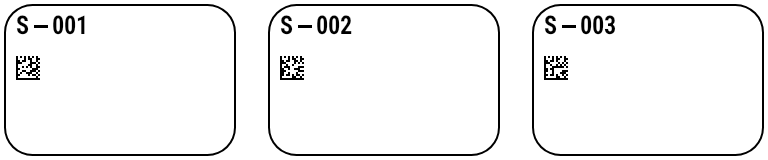
Multi-lane labels
var small = new Label(LabelUnit.Mm, 30, 20)
    .Add(new TextItem { X = 2, Y = 2, DataField = "Sku", FontSize = 9 })
    .Add(new BarcodeItem { X = 2, Y = 7, DataField = "Sku", Symbology = Symbology.DataMatrix });

// 3 labels side by side on a 96 mm liner, 3 mm gap
string zpl = small.For<Line>().Across(3, gap: 3).ToZpl(lines);
Data sources
Binding works with any IEnumerable<T>, IQueryable<T> or IAsyncEnumerable<T>: filtering and sorting run in the database and the labels are streamed. That means every EF Core provider and every database driver with LINQ support works, for example:
- Microsoft SQL Server, Azure SQL, PostgreSQL, MySQL, MariaDB, Oracle, SQLite, Firebird, SAP HANA, IBM Db2 / Informix
- MongoDB, Azure Cosmos DB, Couchbase, RavenDB, Amazon DynamoDB, Elasticsearch, OpenSearch, LiteDB
- Dapper / ADO.NET (
DataRow), Entity Framework Core, C# objects / LINQ, JSON (JsonElement) and dynamic records
JSON & dynamic records, record count, Stream/PipeWriter, expressions
Bind without a class of your own: JsonElement, JsonNode, ExpandoObject, dictionaries, DataRow and LiteDB BsonDocument (paths such as order.no). If the count is known (WithRecordCount, CountQueryableWith or recordCount:), TOTAL_PAGES and PrintJobInfo.RecordCount are available from the first label on. WriteZplAsync writes UTF-8 directly into a Stream or PipeWriter (ASP.NET Core). Variables: LABEL_INDEX, LABEL_NUMBER, LABEL_WIDTH, LABEL_HEIGHT, RECORD_INDEX, PAGE_NUMBER, TOTAL_PAGES plus your own. Functions include Upper Lower Left Right Mid Substring Trim PadLeft Replace Contains If Coalesce IsEmpty IsNumeric Format ToNumber ToDate Today Now AddDays Round Min Max Mod10 Mod11 Mod43 Luhn Gs1CheckDigit VoicePickCode GS1. Numbers and dates use Expressions.Culture (default: invariant); Format/ToNumber optionally take a culture name.
Try it: the live demo binds a JSON template to JSON records (label.For<JsonElement>()) and shows the ZPL, previews and per-phase timings.
// records without a class of their own: JsonElement, JsonNode, ExpandoObject, dictionaries, DataRow, BsonDocument
using var doc = JsonDocument.Parse("""[{"name":"Anna","order":{"no":"A-1"}},{"name":"Ben","order":{"no":"A-2"}}]""");
string zpl = label.For<JsonElement>().ToZpl(doc.RootElement.EnumerateArray());

dynamic d = new ExpandoObject(); d.name = "Cleo";
string one = label.For<ExpandoObject>().ToZpl([(ExpandoObject)d]);

// known count → TOTAL_PAGES/RecordCount available from the first label; UTF-8 straight into a Stream or PipeWriter
var binding = label.For<JsonElement>().WithRecordCount(2);
await binding.WriteZplAsync(rows, response, dpi: 203, recordCount: 2);
await binding.WriteZplAsync(rows, pipe);

// expressions: functions, variables and culture
label.Expressions.Culture = System.Globalization.CultureInfo.GetCultureInfo("de-DE");
label.Add(new TextItem { X = 5, Y = 50,
    Expression = "\"Seite \" + PAGE_NUMBER + \"/\" + TOTAL_PAGES + \" · \" + Format(Today(), \"d\") + \" · \" + Upper(Left(name, 3))" });
Parallel job generation
The formats of a job are built on several threads at once, in blocks of records that grow 1, 2, 4 … 512, so the first labels still stream out at once. Records are read, numbered, counted and copied in order: the ZPL is byte for byte the same as sequential generation – counters, copies, PrintJobInfo, OnProgress, leading and trailing labels, stored formats and multi-across included. Default: all processors (Environment.ProcessorCount) for records whose fields are read without your code – dictionaries, JsonElement, JsonNode, DataRow, strings and primitives. Sequential by default are classes (POCOs), read through their property getters, which may load data lazily (e.g. Entity Framework proxies sharing one DbContext), and jobs that run caller code during generation: Map, custom expression functions, AddTypeReference or a custom Expressions.Clock. WithParallelism(n) sets the number of threads either way – more for classes whose getters are thread-safe, 1 for strictly sequential generation.
// dictionaries, JsonElement, JsonNode, DataRow: formats are built on all cores by default
string zpl = label.For<IReadOnlyDictionary<string, object?>>().ToZpl(rows);

// classes (getters may load lazily, e.g. EF Core proxies) and jobs with Map, custom functions or Clock:
// sequential by default – parallel only when asked for
string fast = label.For<OrderRec>().WithParallelism(Environment.ProcessorCount).ToZpl(orders);

string sequential = label.For<IReadOnlyDictionary<string, object?>>().WithParallelism(1).ToZpl(rows);
// zpl == sequential: same order, counters, copies and PrintJobInfo, byte for byte
Measured with samples/ParallelBench: the template samples/templates/shipping.json (100 × 150 mm, 33 items) bound to 100,000 dictionary records, one job of 135 MB ZPL, median of 11 runs, .NET 10 Release, 16 cores (AMD EPYC 9454P, virtual machine, Windows Server 2025). Sequential (WithParallelism(1)) 9.7 s (workstation GC) / 9.4 s (server GC); default 2.4 s (4.0× faster) with the workstation GC and 1.4 s (6.8× faster) with the server GC. Parallel generation allocates on every thread at once, and the workstation GC collects on one heap – for maximum scaling enable the server GC in the application (<ServerGarbageCollection>true</ServerGarbageCollection> in the project file, the default for ASP.NET Core apps, or DOTNET_gcServer=1).
dotnet run -c Release --project samples/ParallelBench -- samples/templates/shipping.json 100000 11