


12Print jobs & bulk printing
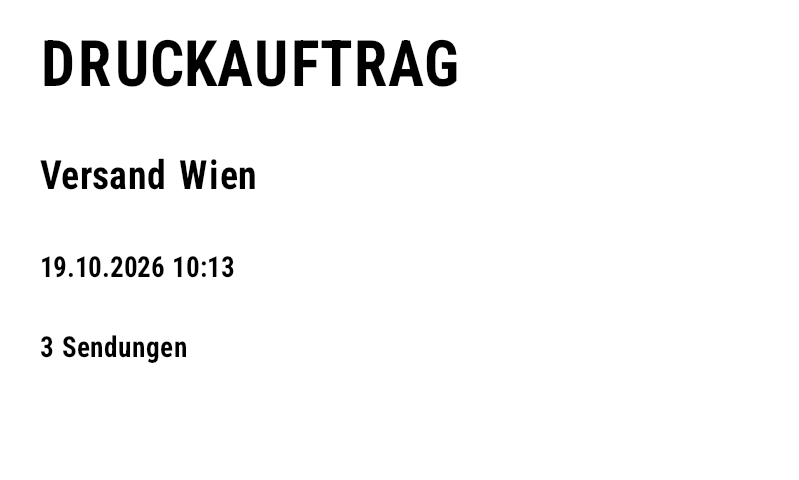
A print job is one ZPL stream: an optional leading label, one label per record and an optional trailing label. With CutAfterLastLabel() the whole job runs in tear-off mode and the cut happens only after the last label.
Leading label, trailing label and cut (LabelBinding)
// header and trailer labels are bound to PrintJobInfo:
// JobName, Created, RecordCount, LabelCount, FirstKey, LastKey
var leading = new Label(LabelUnit.Mm, 100, 60)
    .Add(new TextItem { X = 5, Y = 5, Text = "DRUCKAUFTRAG", FontSize = 22 })
    .Add(new TextItem { X = 5, Y = 20, DataField = "JobName", FontSize = 14 })
    .Add(new TextItem { X = 5, Y = 32, Expression = "Format([Created], \"dd.MM.yyyy HH:mm\")" })
    .Add(new TextItem { X = 5, Y = 42, Expression = "[RecordCount] + \" Sendungen\"" });
var trailing = new Label(LabelUnit.Mm, 100, 60)
    .Add(new TextItem { X = 5, Y = 5, Text = "ENDE DES AUFTRAGS", FontSize = 18 })
    .Add(new TextItem { X = 5, Y = 20, Expression = "[LabelCount] + \" Labels gedruckt\"" })
    .Add(new TextItem { X = 5, Y = 30, Expression = "\"von \" + [FirstKey] + \" bis \" + [LastKey]", FontSize = 9 });
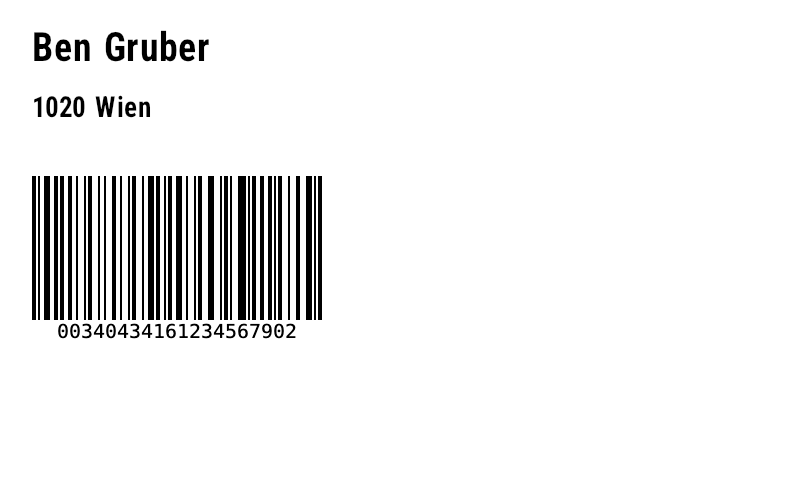
var label = new Label(LabelUnit.Mm, 100, 60)
    .Add(new TextItem { X = 4, Y = 4, DataField = "Name", FontSize = 14 })
    .Add(new TextItem { X = 4, Y = 12, DataField = "City" })
    .Add(new BarcodeItem { X = 4, Y = 22, DataField = "TrackingNo", BarHeight = 18 });

string zpl = label.For<Parcel>()
    .Job("Versand Wien", p => p.TrackingNo)   // name + key for FirstKey/LastKey
    .Copies(p => p.Parcels)                   // LabelCount includes copies
    .WithLeadingLabel(leading)
    .WithTrailingLabel(trailing)
    .CutAfterLastLabel()                      // 1st format ^MMT (tear-off), last ^MMC (cut)
    .ToZpl(parcels);                          // list → RecordCount already known on the header label
| Method / field | Meaning |
|---|---|
.Job(name, keySelector) | job name and per-record key (e.g. tracking number) for FirstKey/LastKey |
.WithLeadingLabel(label) | leading label, bound to PrintJobInfo |
.WithTrailingLabel(label) | trailing label with totals, bound to PrintJobInfo |
.CutAfterLastLabel() | the first format gets ^MMT (tear-off, applies to all following), only the last format ^MMC (cut) |
PrintJobInfo.JobName, Created | name and creation time of the job |
PrintJobInfo.RecordCount | number of records – known in the leading label when a list/collection is passed; always set in the trailing label |
PrintJobInfo.LabelCount | printed labels including copies (Copies) |
PrintJobInfo.FirstKey, LastKey | key of the first and last record |
All fields can be used as DataField or in expressions ([RecordCount] + " Sendungen"). The result for three shipments (one of them with two copies): 5 formats, 6 labels.
Leading label
Record 2 (^PQ2)
Trailing label (^MMC)

Show generated ZPL
PrintJobTemplate: one job from JSON templates
PrintJobTemplate combines the leading, record and trailing label together with options. Load from three label templates (FromFiles(leading, label, trailing), leading/trailing optional) or from one JSON file (ToJson/FromJson); SaveFiles splits it back into three files. For<T>() returns the fully configured LabelBinding<T>.
// three JSON templates (e.g. from a designer) → ONE print job
var job = PrintJobTemplate.FromFiles("templates/leading.json", "templates/shipping.json", "templates/trailing.json");
job.JobName = "Tagesversand";
job.CutAfterLastLabel = true;          // cut only after the trailer label
job.StoredFormatName = "R:SHIP.ZPL";   // template once via ^DF, then only ^XF + ^FN values
job.KeyField = "TrackingNo";           // FirstKey/LastKey on the trailer
job.CopiesField = "Parcels";           // ^PQ per record

string zpl = job.For<Shipment>().ToZpl(shipments.ToList());

// the same job as ONE JSON file – or split back into three files
File.WriteAllText("printjob.json", job.ToJson());
PrintJobTemplate same = PrintJobTemplate.FromJson(File.ReadAllText("printjob.json"));
same.SaveFiles("leading.json", "shipping.json", "trailing.json");
| Option | Effect |
|---|---|
JobName | name for PrintJobInfo.JobName (default "Druckauftrag") |
CutAfterLastLabel | ^MMT for all, ^MMC only for the last label |
StoredFormatName | store the record label once via ^DF, then only ^XF + ^FN |
KeyField | property path for FirstKey/LastKey |
CopiesField | property path for the number of copies per record |
leading.json (excerpt)
printjob.json – everything in one file (excerpt)
Templates: leading.json · shipping.json · trailing.json · printjob.json
Bulk data demo: EF Core + LiteDB → one .zpl file
samples/MassDataDemo loads the three templates, queries 50 shipments via LINQ from SQLite (EF Core) or LiteDB and writes one job each: leading label, ^DF template, 50 shipping labels, trailing label, cut.
// samples/MassDataDemo: 50 shipping labels + header + trailer + cut in ONE .zpl file
var job = PrintJobTemplate.FromFiles("templates/leading.json", "templates/shipping.json", "templates/trailing.json");
job.CutAfterLastLabel = true;        // tear-off for all, cut after the trailer label
job.KeyField = "TrackingNo";         // first/last shipment number on the trailer

// ---------- EF Core + SQLite ----------
using var connection = new SqliteConnection("Data Source=:memory:");
connection.Open();
var options = new DbContextOptionsBuilder<ShippingDb>().UseSqlite(connection).Options;
using var db = new ShippingDb(options);
db.Database.EnsureCreated();
db.Shipments.AddRange(seedData);
db.SaveChanges();

var query = db.Shipments.AsNoTracking()          // executed by SQLite
    .Where(s => !s.Printed && s.Service == "EXPRESS")
    .OrderByDescending(s => s.Id)
    .Take(50);

job.JobName = "EF Core · Express";
job.StoredFormatName = "R:SHIP.ZPL";             // template once, then only field values
string efZpl = job.For<Shipment>()
    .Map("Total", s => s.WeightKg.ToString("0.0") + " kg")
    .ToZpl(query.ToList());
File.WriteAllText("massdata-efcore.zpl", efZpl);

// ---------- LiteDB ----------
using var lite = new LiteDatabase(new MemoryStream());
var col = lite.GetCollection<Shipment>("shipments");
col.InsertBulk(seedData);
col.EnsureIndex(s => s.Country);
var docs = col.Query().Where(s => s.Country == "AT").OrderBy(s => s.TrackingNo).Limit(50).ToEnumerable();

job.JobName = "LiteDB · Österreich";
job.StoredFormatName = null;                     // full format per label
string liteZpl = job.For<Shipment>()
    .Map("Total", s => s.WeightKg.ToString("0.0") + " kg")
    .ToZpl(docs.ToList());
File.WriteAllText("massdata-litedb.zpl", liteZpl);

// preview of the whole job as PDF
var renderer = new ZplRenderer(new ZplRenderSettings { OutputFormat = ZplOutputFormat.Pdf }.WithLabelSizeMm(100, 150));
File.WriteAllBytes("massdata-efcore.pdf", renderer.ProcessCommands(efZpl)[0]);
dotnet run --project samples/MassDataDemo -- samples/output samples/templates
Leading label (^MMT)

Shipping label 1 of 50
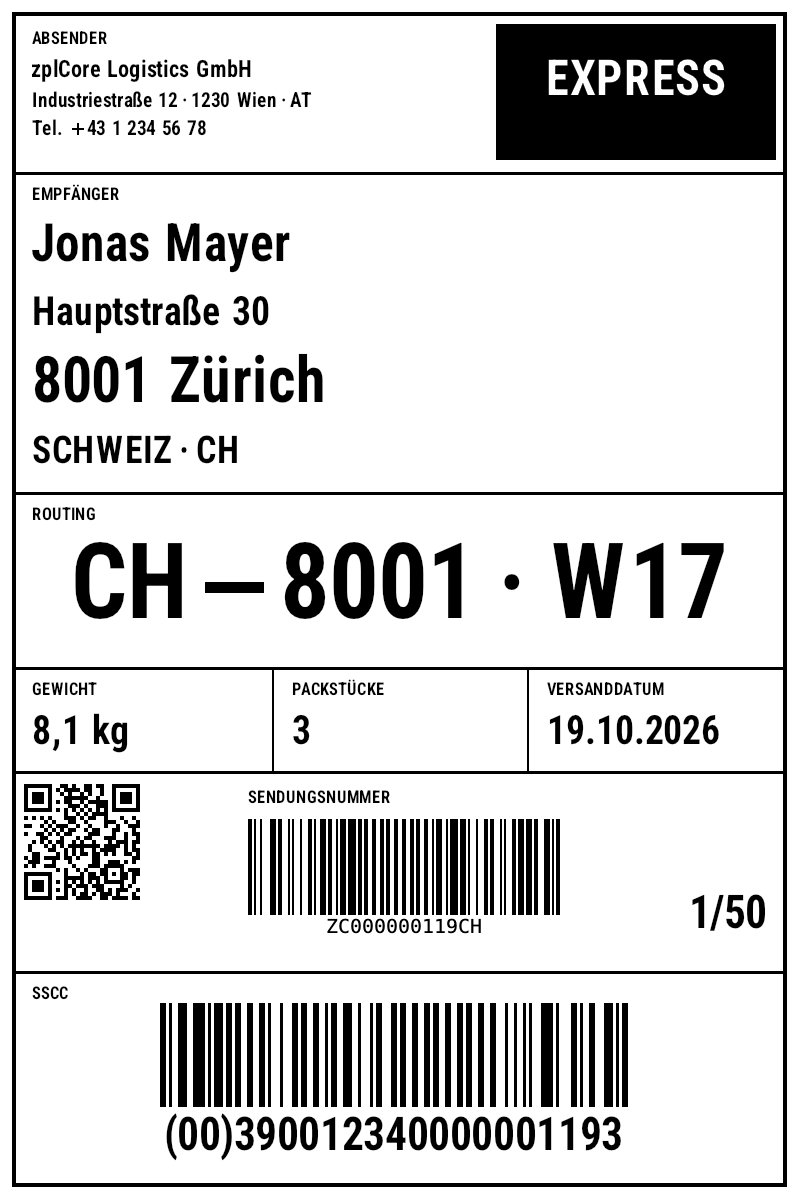
Trailing label (^MMC)
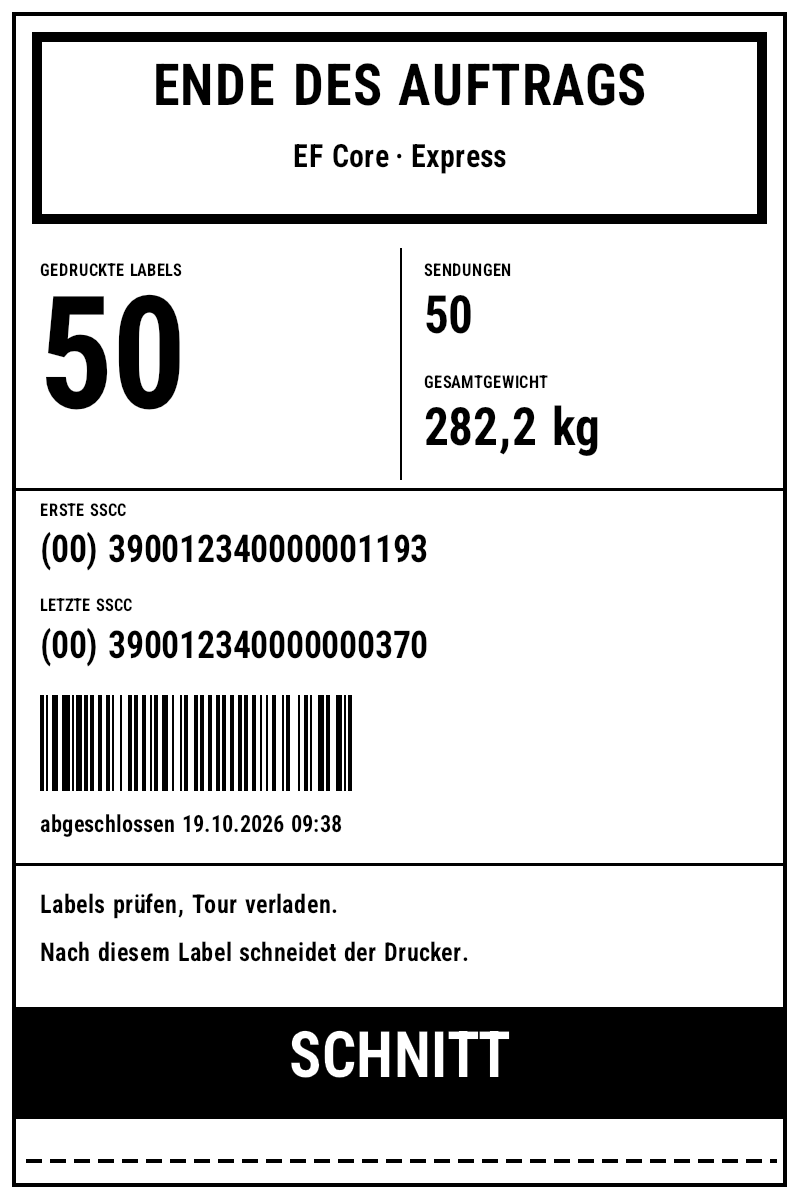
massdata-efcore.zpl (excerpt)
^DF/^XF) · massdata-efcore.pdf · massdata-litedb.zpl (17 KB, full formats) · massdata-litedb.pdf – 52 labels each.More on zplCloud.com: Template: Shipping label · Template: Shipping label 100 × 150 mm with GS1-128 SSCC