


10Label model
ZplCore.Labels.Label describes a label in Mm, Cm, Inch, Point or Dots. From it you get ZPL, preview PNG/PDF, HTML and JSON.
More on zplCloud.com: Template: label template catalog
TextItem
Font, FontSize (pt), Rotation, Width/MaxLines/Alignment (→ ^FB), CounterStep, MaxLength, HideIfEmpty, AutoFit, ValidationRegex, InputMask, Bold (native double strike), ShortHyphen (short font 0 hyphen)
BarcodeItem
all 144 symbologies (ZPL command or ^GFA graphic), generator options (colors, human-readable text, QR version/mask, module shapes), ModuleWidth, WideRatio, BarHeight, HumanReadable(Above), AddChecksum, QrErrorCorrection, HideIfEmpty (no ZPL when the data is empty); Width/Height fit a native barcode into a box (largest module width that fits, FitSample for bound data)
Shapes
RectangleItem (CornerRounding, Fill, White), LineItem, EllipseItem, CircleItem
ImageItem
PNG/JPEG/SVG → ^GFA, dither or threshold, Width/Height
TableItem · RepeaterItem
tables with [Field] placeholders; repetition per element of a collection
RfidItem · RawZplItem
^RF write command, or ZPL 1:1 as an escape hatch
Common to all elements: Name, X/Y, Visible, DataField + DataFieldFormat, Expression, Reverse, PrintAsGraphic. At label level: GapLength, Darkness, PrintSpeed, PrintInverted, PrintMirror, CutAfterPrinting.
Cultures: DataFieldFormat formats with TextItem.CultureName (e.g. "de-DE"; without it: invariant with a format, the current culture without). Every culture-dependent formatting of zplCore – bound fields, number texts, table cells, expressions, clock fields – prints the same on every operating system: dates use the culture's standard calendar from a fixed table (ExpressionEngine.StandardCalendar: ar-SA Umm al-Qura, th Thai Buddhist, Persian for fa, ps, ckb-IR, lrc, mzn, uz-Arab; all others Gregorian), and special spaces such as the narrow no-break space in fr-FR thousands or 2:30 PM become plain spaces. Details: cultures in the expression reference.
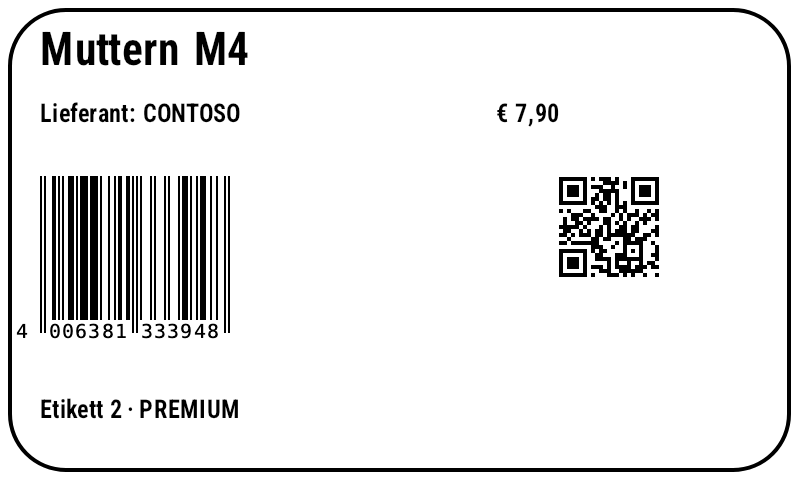
var label = new Label(LabelUnit.Mm, 100, 60)
    .Add(new RectangleItem { X = 1, Y = 1, Width = 98, Height = 58, StrokeThickness = 0.5, CornerRounding = 2 })
    .Add(new TextItem { X = 5, Y = 4, DataField = "Name", FontSize = 16 })
    .Add(new TextItem { X = 5, Y = 13, Expression = "\"Lieferant: \" + Upper([Supplier.Name])", FontSize = 9 })
    .Add(new TextItem { X = 62, Y = 13, DataField = "Price", DataFieldFormat = "€ 0.00", FontSize = 9 })
    .Add(new BarcodeItem { X = 5, Y = 22, DataField = "Sku", Symbology = Symbology.Ean13, BarHeight = 18 })
    .Add(new BarcodeItem { X = 70, Y = 22, DataField = "Url", Symbology = Symbology.QrCode, BarHeight = 4 })
    .Add(new TextItem { X = 5, Y = 50, FontSize = 9,
        Expression = "\"Etikett \" + LABEL_NUMBER + \" · \" + If([Price] > 5, \"PREMIUM\", \"STANDARD\")" });

string zpl = label.ToZpl(products);              // one label per record
byte[] preview = label.RenderPng();              // preview without data
File.WriteAllText("label.json", label.ToJson());
Label copy = Label.FromJson(File.ReadAllText("label.json"));

Show generated ZPL
Barcode options in the label (BarcodeItem.Options)
BarcodeItemOptions brings every render and symbology option of the generator into the label model (colors, borders, padding, human-readable text position, Data Matrix size, Aztec layers, TLC39 gap …) and is stored in the label JSON. Without any option set, the native ZPL command is kept; with options, the barcode is output as a ^GFA graphic.
var label = new Label(LabelUnit.Dots, 600, 600).Add(new BarcodeItem
{
    X = 20, Y = 20, Symbology = Symbology.DataMatrix, Code = "Label options",
    Options = new BarcodeItemOptions                // every generator option, also in JSON
    {
        DataMatrixSize = "32x32", BorderColor = "#000000",
        PaddingLeft = 8, PaddingTop = 8, PaddingRight = 8, PaddingBottom = 8,
    },
}).Add(new BarcodeItem
{
    X = 20, Y = 300, Symbology = Symbology.Tlc39, Code = "123456,SERIAL1", ModuleWidth = 3, BarHeight = 90,
    Options = new BarcodeItemOptions { TextPosition = BC.BarcodeTextPosition.None, Tlc39Gap = 3 },
});
string zpl = label.ToZpl();                          // with options: the generator's ^GFA graphic
Expressions
Fields as [Name] or [Customer.Address.City], element names ([TextItem1]), literals, operators + - * / % (+ concatenates text), = <> < <= > >=, and/or/not. Variables LABEL_INDEX, LABEL_NUMBER and your own.
var label = new Label();
label.Expressions.Variables["SHIFT"] = "B";
label.Expressions.Functions["Euro"] = args => $"{ExpressionEngine.Num(args[0]):0.00} €";

label.Add(new TextItem { Expression = "Euro([Price] * 1.2) + \" / Schicht \" + SHIFT" });
label.Add(new TextItem { Y = 8, Expression = "Format(AddDays(Today(), 30), \"dd.MM.yyyy\")" });
label.Add(new TextItem { Y = 16, Expression = "Gs1CheckDigit(\"95060001343\")" });

var engine = new ExpressionEngine();
string s = engine.EvaluateToString("PadLeft(Str(42), 6, \"0\")");   // "000042"
Types, custom functions and variables
Expressions may call public members of registered types (AddTypeReference) – everything else stays blocked. SetCustomFunction/SetCustomVariable are the chainable counterparts of Functions[…]/Variables[…].
var label = new Label();
label.Expressions
    .AddTypeReference(typeof(Math))                 // Math.Max(1, [Qty]) …
    .AddTypeReference<DateTime>()                   // DateTime.Now.AddDays(3)
    .SetCustomVariable("WERK", "Graz")
    .SetCustomFunction("Kg", args => $"{ExpressionEngine.Num(args[0]):0.0} kg");

label.Add(new TextItem { Expression = "\"Werk \" + WERK + \": \" + Kg([Weight])" });
label.Add(new TextItem { Y = 8, Expression = "Math.Max(1, [Qty]) + \" Stk\"" });
label.Add(new TextItem { Y = 16, Expression = "DateTime.Now.AddDays(3).ToString(\"dd.MM.\")" });
// unregistered types are blocked → FormatException
Tables & repeaters
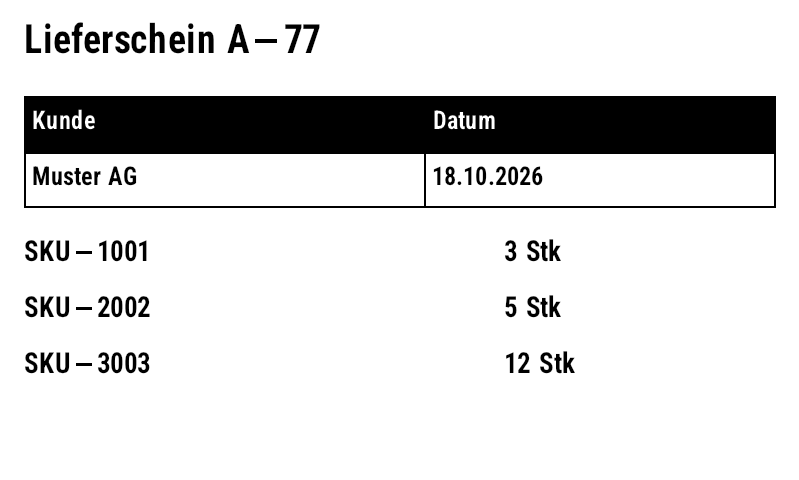
var label = new Label(LabelUnit.Mm, 100, 60)
    .Add(new TextItem { X = 3, Y = 3, Expression = "\"Lieferschein \" + [No]", FontSize = 14 })
    .Add(new TableItem
    {
        X = 3, Y = 12, ColumnWidths = [50, 44], RowHeights = [7, 7], HeaderRow = true, FontSize = 9,
        Cells = [["Kunde", "Datum"], ["[Customer]", "18.10.2026"]],
    })
    .Add(new RepeaterItem
    {
        X = 3, Y = 30, OffsetY = 7, MaxCount = 4, DataField = "Lines",   // one row per line item
        Items = [new TextItem { DataField = "Sku" }, new TextItem { X = 60, DataField = "Qty", DataFieldFormat = "0 Stk" }],
    });

byte[] png = label.For<Order>().Render([order]).First();
How it works
The repeater reads the record's Lines collection and offsets its child elements by OffsetY per entry; children bind to the entry's members. MaxCount limits the number of rows.
Validation, AutoFit, Micro QR, HTML
var label = new Label(LabelUnit.Mm, 100, 60)
    .Add(new TextItem { Name = "Plz", DataField = "Plz", ValidationRegex = @"^\d{4,5}$" })
    .Add(new TextItem { Name = "Lot", X = 30, DataField = "Lot", InputMask = "AA-0000", MaxLength = 7 })
    .Add(new TextItem { Y = 8, DataField = "Hinweis", HideIfEmpty = true })
    .Add(new TextItem { Y = 16, DataField = "Name", Width = 90, FontSize = 20, AutoFit = true })
    .Add(new BarcodeItem { Y = 30, Code = "01234567", Symbology = Symbology.MicroQr, BarHeight = 4 })
    .Add(new RfidItem { Data = "3034257BF7194E4000001A85" });

var record = new Dictionary<string, object?> { ["Plz"] = "x", ["Lot"] = "AB-12", ["Name"] = "Sehr langer Produktname" };
foreach (string error in label.Validate(record))
    Console.WriteLine(error);                        // "Plz: 'x' does not match ^\d{4,5}$" ...

File.WriteAllText("vorschau.html", label.ToHtml(records: [record]));
Mask counters (Mask / MaskIncrement)
Counters with mixed positions: digits, letters and alphanumeric positions form a mixed-radix number – the carry rolls over from 9999 into the letters, and at the end the mask starts over. The increment is "+1", "-2" or per position such as "0010". Works in the ZPL, EPL and Fingerprint export.
var label = new Label(LabelUnit.Mm, 50, 25)
    .Add(new TextItem { X = 3, Y = 3, Text = "Charge", FontSize = 9 })
    // mask: # / 0 digit, A letter, a lowercase letter, ? alphanumeric, anything else literal
    .Add(new TextItem { X = 3, Y = 9, Text = "AZ-9998", Mask = "AA-0000", MaskIncrement = "+1", FontSize = 16 })
    // per-digit increment: "0010" counts up the tens digit (with carry)
    .Add(new TextItem { X = 30, Y = 3, Text = "0100", Mask = "####", MaskIncrement = "0010", FontSize = 9 });

string zpl = label.ToZpl();   // AZ-9998, AZ-9999, BA-0000 … (carry into the letters)

Label sheets (LabelSheet)
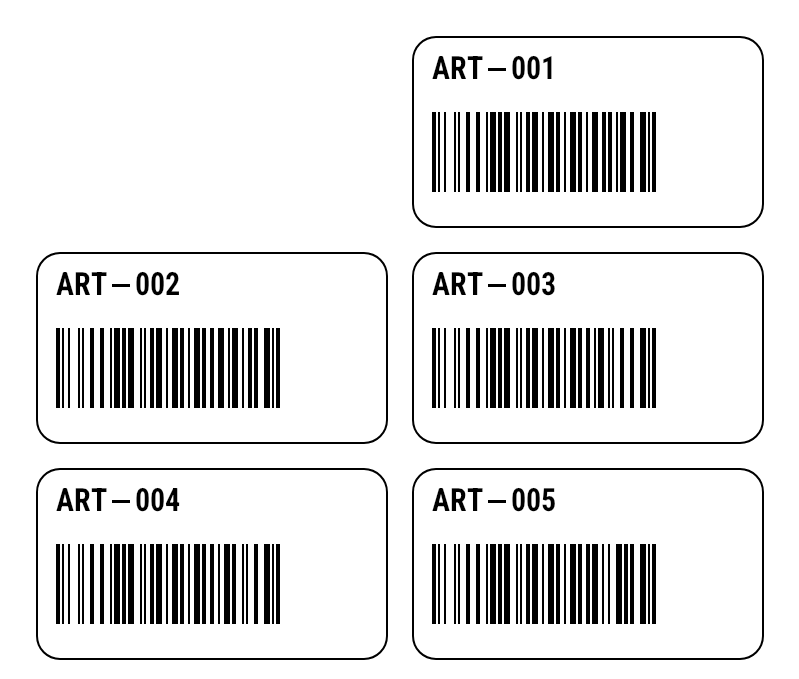
LabelSheet places labels on A4 office sheets or wide media: rows, columns, margins, gaps, order (RowWise/ColumnWise) and a start position for partially used sheets. Output as one PNG per sheet, PDF or ZPL (side by side on wide media), serializable as JSON.
var label = new Label(LabelUnit.Mm, 45, 25)
    .Add(new RectangleItem { X = 0.5, Y = 0.5, Width = 44, Height = 24, CornerRounding = 2 })
    .Add(new TextItem { X = 3, Y = 3, DataField = "Sku", FontSize = 11 })
    .Add(new BarcodeItem { X = 3, Y = 10, DataField = "Sku", BarHeight = 10, HumanReadable = false });

var sheet = new LabelSheet
{
    PageWidth = 100, PageHeight = 85, Rows = 3, Columns = 2,       // mm, small sheet
    MarginLeft = 4, MarginTop = 4, HorizontalGap = 2, VerticalGap = 2,
    Order = LabelSheetOrder.RowWise,
    StartPosition = 2,                                            // continue a partially used sheet
};
var items = Enumerable.Range(1, 5).Select(i => new { Sku = $"ART-{i:000}" });
List<byte[]> pages = sheet.ToPng(label, items);   // one PNG per sheet
byte[] pdf = sheet.ToPdf(label, items);           // office printer
string json = sheet.ToJson();
Multi-page labels & duplex (Label.Pages)
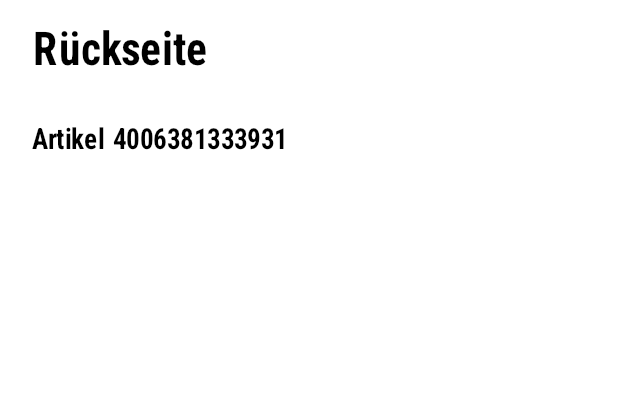
Items is page 1, AddPage() adds further pages (page 2 = back side on duplex printers). Each page becomes its own format; with UseStoredFormat each page gets its own ^DF format (R:NAME2.ZPL …).
var label = new Label(LabelUnit.Mm, 80, 50)
    .Add(new TextItem { X = 4, Y = 4, Text = "Vorderseite", FontSize = 16 })
    .Add(new BarcodeItem { X = 4, Y = 16, DataField = "Sku", BarHeight = 14 });
label.AddPage("Rückseite")                     // page 2 = back side on duplex printers
    .Add(new TextItem { X = 4, Y = 4, Text = "Rückseite", FontSize = 16 })
    .Add(new TextItem { X = 4, Y = 16, Expression = "\"Artikel \" + [Sku]" });

int count = label.PageCount;                     // 2 – each page becomes its own format
string zpl = label.ToZpl(new[] { new { Sku = "9506000134352" } });
Page 1

Page 2
Duplex, per-side frames, table corners, counters & input masks
Duplex convention: Label.Duplex outputs every copy as a front/back pair (^FXDUPLEX FRONT/BACK, a missing back side is blank). FrameThickness sets frames per side, TableItem.CornerRounding rounded corners, CounterUseLeadingZeros controls leading zeros, InputMaskPromptChar the placeholder and ValidationErrorMessage a custom message ({name}, {value}). The label JSON has schemaVersion 3; version 2 is migrated on load.
var label = new Label(LabelUnit.Mm, 50, 30) { Duplex = true };   // front/back as pairs
label.Add(new TextItem { Text = "FRONT", Width = 40, Height = 8,
    FrameThickness = new FrameThickness { Top = 0.5, Bottom = 0.3 } });   // frame per page
label.AddPage("back").Items.Add(new TextItem { Text = "BACK" });
label.Add(new TableItem { Y = 12, ColumnWidths = [20, 20], RowHeights = [6], CornerRounding = 4, Cells = [["a", "b"]] });
label.Add(new TextItem { Y = 20, Text = "A0001", CounterStep = 1, CounterUseLeadingZeros = true });
label.Add(new TextItem
{
    Name = "Lot", Y = 25, Text = "AB-1234", InputMask = "AA-0000", InputMaskPromptChar = '_',
    ValidationErrorMessage = "{name} ist ungültig: {value}",
});
IReadOnlyList<string> errors = label.Validate();
string zpl = label.ToZpl(copies: 2);       // FRONT, BACK, FRONT, BACK
Item references & localization
Expressions and table cells access the text of other items with [Items.Name] or [Items.Name.Text] (forward references work too; circular references yield ""). Multilingual templates: Label.Strings (via AddString), Label.Culture and {t:key} placeholders; resolution de-CH → de → "" → key; per print job with LabelBinding.WithCulture.
var label = new Label(LabelUnit.Dots, 400, 200)
    .Add(new TextItem { Name = "Total", Expression = "\"Summe: \" + [Items.Price.Text]" })
    .Add(new TextItem { Name = "Price", Y = 50, Expression = "Format(2 * 21, \"0.00\", \"de-DE\")" })
    .Add(new TableItem { Y = 100, ColumnWidths = [200], RowHeights = [30], Cells = [["[Items.Total]"]] });
var l = new Label(LabelUnit.Dots, 400, 200) { Culture = "de-CH" }
.AddString("", "weight", "Weight") // Fallback
.AddString("de", "weight", "Gewicht") // de-CH → de → "" → key
.AddString("fr", "weight", "Poids");
l.Add(new TextItem { Text = "{t:weight}: 5 kg" });
string de = l.ToZpl(); // Weight: 5 kg
string fr = l.For<Dictionary<string, object?>>().WithCulture("fr-FR").ToZpl([new()]); // Poids: 5 kgText sizing, styles, images, shapes, RFID & schema version
TextItem.Sizing chooses between fixed size, ShrinkToFit and FitToBox (natively via ^FB), Stretch, Arc/OuterArc (as a graphic) and stacked characters (^FPV). Plus vertical alignment, padding, character spacing, foreground/background, border, outline, bold/italic/underline/strikethrough, slashed zero, RTL and culture. ImageItem scales with aspect ratio, mirrors, dithers (Threshold, Floyd-Steinberg, Atkinson, Bayer, Otsu) and can store the graphic once in printer memory. Shapes have stroke styles (Solid, Dash, Dot, DashDot), fill and per-corner radii; tables have row/column fills and individually switchable lines. RfidItem writes EPC/TID/user memory with tag type, passwords and locks. Every item can have its own unit; the JSON carries schemaVersion 3 and is migrated on load.
var label = new Label(LabelUnit.Mm, 100, 60)
    .Add(new TextItem
    {
        Name = "title", X = 5, Y = 5, Width = 90, Height = 12, Text = "Sehr langer Artikelname",
        Sizing = TextSizing.ShrinkToFit,              // also FitToBox, Stretch, Arc, OuterArc …
        VerticalAlignment = TextVerticalAlignment.Middle, Padding = new ItemPadding(1),
        Bold = true, Underline = true, CharSpacing = 0.2,
        ForeColor = ItemColor.White, Background = ItemColor.Black, BorderThickness = 0.3,
    })
    .Add(new ImageItem
    {
        X = 70, Y = 20, Width = 25, LockAspectRatio = ImageAspectRatio.Width,
        ImageData = logoPng, DitherMethod = DitherMethod.Atkinson,   // Threshold, FloydSteinberg, Bayer, Otsu
        UsePrinterStorage = true, StorageName = "R:LOGO.GRF",          // ~DG once, then ^XG
    })
    .Add(new RectangleItem { X = 5, Y = 20, Width = 60, Height = 30, StrokeStyle = StrokeStyle.Dash,
                             CornerRadius = new CornerRadius(2), Fill = ItemColor.None })
    .Add(new BarcodeItem { X = 8, Y = 24, Symbology = Symbology.Gs1DataMatrix,  // all 144 symbologies
                           Code = "(01)09521234543213(10)LOT42", ModuleWidth = 4 })
    .Add(new RfidItem { Data = "3034257BF7194E4000001A85", MemoryBank = RfidMemoryBank.Epc,
                        TagType = RfidTagType.EpcClass1Gen2, AccessPassword = "12345678",
                        MemoryBankLock = RfidLockValue.Lock });

string json = label.ToJson();            // "schemaVersion": 3; older JSON is migrated on load
var copy = Label.FromJson(json);
var inch = label.ConvertToUnit(LabelUnit.Inch);
return label.ToZpl(dpi: 300);
Native bold, white on black, barcodes in a box & compact human-readable line
TextItem.Bold prints natively: the field is struck twice, the second time offset by height / 18 (at least 1 dot) along the text direction – resident font 0, bitmap fonts and downloaded ^A@ fonts, also wrapped (^FB) and rotated by 90° steps. Italic, underline, strikeout, outline and Reverse still print as a ^GFA graphic. A black Background box (or ForeColor = ItemColor.White over black) prints white text natively: the box as ^GB, the field with ^FR on top. White text that needs the graphic path – bold, italic, underlined – prints the box natively and its glyph mask once with ^FR, so the glyphs also turn white over anything under the box (a second ^FR strike for bold would cancel the first).
BarcodeItem.Width / Height (label units) fit a native barcode into a box: the largest whole module width whose bars fit Width (a barcode turned by 90°/270° uses Height) and a bar height that leaves room for the interpretation line; QR, Data Matrix and Aztec get the largest module size that fits both. The sizes are measured on the native symbol as the printer draws it, so the output stays ^BY + barcode command – no ^GFA. With bound data each value could get another module width; FitSample chooses it from a given value, e.g. the longest one the field will get, so every label of a job shares it and a stored format keeps the barcode as a ^FN field (without FitSample it is sent complete with each record).
HumanReadableHeight (label units) prints a compact interpretation line: the barcode goes out without the printer's own line, whose font grows with the module width and takes bar height, and the text is set in font 0 of this height below the bars (above with HumanReadableAbove) – EAN-13, EAN-8 and UPC-A in their digit groups under the bar halves, other linear symbologies centred, also turned by 90° steps; box fitting subtracts this line instead of the printer's. It applies to linear barcodes (not to 2D, stacked, GS1 DataBar or postal symbologies), and the output stays native.
var label = new Label(LabelUnit.Mm, 100, 38);
label.Add(new TextItem { X = 4, Y = 3, Text = "Bestellung 4711", FontSize = 16,
    Bold = true });                                                    // native double strike, no ^GFA
label.Add(new TextItem { X = 62, Y = 2, Width = 34, Height = 10, DataField = "Service", FontSize = 14,
    Alignment = TextAlignment.Center, VerticalAlignment = TextVerticalAlignment.Middle,
    Background = ItemColor.Black });                                   // white on black: ^GB box + ^FR field
label.Add(new BarcodeItem { X = 4, Y = 16, Symbology = Symbology.Code128, DataField = "TrackingNo",
    Width = 56, Height = 18, FitSample = "ZP0000000000" });           // largest module width that fits 56 × 18 mm
label.Add(new BarcodeItem { X = 66, Y = 16, Symbology = Symbology.Ean13, Code = "590123412345",
    Height = 18, HumanReadableHeight = 2.5 });                       // compact human-readable line, 2.5 mm high
string zpl = label.For<IReadOnlyDictionary<string, object?>>().ToZpl(records);
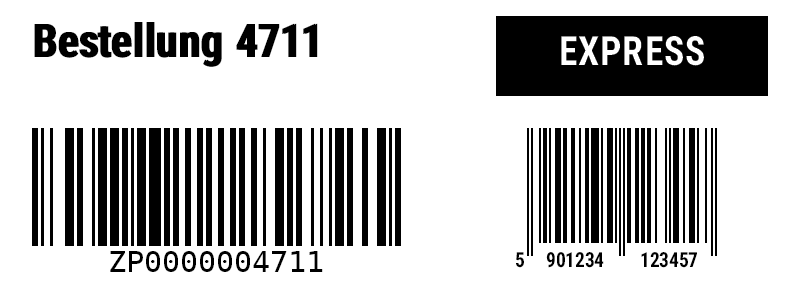
ZPL
^XA
^CI28
^PW799
^LL304
^LH0,0
^FO32,24^A0N,45,45^FDBestellung 4711^FS^FO34,24^A0N,45,45^FDBestellung 4711^FS
^FO496,16^GB272,80,80,B,0^FS^FO496,36^A0N,39,39^FB272,1,0,C,0^FR^FDEXPRESS^FS
^FO32,128^BY3,3.0,118^BCN,118,Y,N,N,A^FDZP0000004711^FS
^FO527,128^BY2,3.0,115^BEN,115,N,N^FD590123412345^FS^FO507,252^A0N,20,20^FB18,1,0,R,0^FD5^FS^FO533,252^A0N,20,20^FB84,1,0,C,0^FD901234^FS^FO627,252^A0N,20,20^FB84,1,0,C,0^FD123457^FS
^XZ
Label JSON schema & compatibility
LabelSchema.JsonSchema() generates a JSON Schema (draft 2020-12) of the label JSON from the model: item types by their type discriminator, enums by name and the initial value of every property as default – a property left out of a label JSON has this value, because ToJson() writes only what differs from a new instance. The schema of the current version is published as label.schema.json for editor completion, validation and generated types in other languages. Compatibility rule: within a schema version (currently 3, Label.CurrentSchemaVersion) changes are additive only – new optional properties whose initial value prints what labels printed before. Renaming or removing a property, or changing its type, meaning or initial value, needs a new schema version with a migration; Label.FromJson migrates older JSON on load. Tests in the build keep the published schema equal to the model, the frozen schema of the current version contained in it, and labels of every older version printing their frozen ZPL. Label.FromJson(json, strict: true) rejects properties the model does not know (typos, properties of another tool) with a JsonException; the default stays tolerant and skips them. Use strict where JSON comes from outside – APIs, generated templates.
var schema = LabelSchema.JsonSchema();      // JSON Schema (draft 2020-12), generated from the model
File.WriteAllText("label.schema.json", schema.ToJsonString(new JsonSerializerOptions { WriteIndented = true }));

try
{
    var label = Label.FromJson(jsonFromApi, strict: true);   // unknown property → JsonException
}
catch (JsonException ex)
{
    Console.WriteLine(ex.Message);   // The JSON property 'fontSzie' could not be mapped to any .NET member …
}
Label tag, Code 128 function codes, job progress, PDF image quality & overflow split
Label.Tag keeps your own data (an id, notes) in the label JSON; it does not print. For GS1-128 write the bracketed form "(01)…(10)…(17)…" or build it with GS1(ai1, value1, ai2, value2, …), which checks every AI and value (known AI, length, character set, check digit) and fails with a clear message instead of printing a wrong code; with Symbology.Gs1_128 the FNC1 separators after variable-length values are added automatically and the barcode stays a native ^BC – Validate() points out hand-set >8. LabelBinding.OnProgress reports every printed label (LabelProgress: record index, copy, copies, label index, record count when known) in label order as its format is handed out – also with parallel generation, on the thread that enumerates the job. ZplRenderSettings.PdfImageQuality (raster PDF, PdfVector = false) and RenderPdf(records, dpi, imageQuality) embed the pages as JPEG of quality 1–100 instead of lossless (101, the default) – worth it for labels with photos or grey images; plain black-and-white labels are usually smaller lossless. TextSizing.OverflowSplit splits at spaces, tabs and line breaks, finds the longest fitting part by binary search and breaks a word longer than the box instead of letting it overflow; text that fits prints as before.
var label = new Label(LabelUnit.Mm, 100, 50) { Tag = "erp:4711" };   // your own data, does not print
label.Add(new BarcodeItem { X = 5, Y = 5, Symbology = Symbology.Gs1_128,
    Expression = "GS1(\"01\", [Gtin], \"10\", [Lot], \"17\", [Expiry])" });   // checked, FNC1 separators added automatically
label.Add(new TextItem { Name = "Text1", X = 5, Y = 25, Width = 40, MaxLines = 2, DataField = "Description",
    Sizing = TextSizing.OverflowSplit, OverflowItemName = "Text2" });   // splits at spaces, tabs, line breaks
label.Add(new TextItem { Name = "Text2", X = 50, Y = 25, Width = 45, MaxLines = 4 });

var job = label.For<IReadOnlyDictionary<string, object?>>()
    .OnProgress(p => Console.WriteLine($"Etikett {p.LabelIndex + 1}: Datensatz {p.RecordIndex + 1}/{p.RecordCount}, Kopie {p.CopyIndex + 1}/{p.Copies}"));
string zpl = job.ToZpl(records);                          // progress in label order, also in parallel
byte[] pdf = job.RenderPdf(records, 203, imageQuality: 80); // raster PDF with JPEG (101 = lossless)
HTML rich text, printed natively
TextItem.Markup = TextMarkup.Html reads the text (or the bound value) as HTML: <b> <i> <u> <s> <mark>, <span style="font-family/font-size/color/background-color/font-weight/font-style/text-decoration">, <font>, <p>/<div> (also text-align) and <br>. zplCore breaks the lines over the styled pieces itself – measured with the renderer's own fonts – and prints one native ^FO/^A field per piece with its own font and size on a common baseline: bold as the native double strike, underline and strikeout as ^GB bars, highlight as a black ^GB box with the piece reversed (^FR). Only italic and grey pieces become small ^GFA graphics; colours print black, near-white prints white. Alignment (also justified), padding, box, line spacing and the sizing modes apply: ShrinkToFit shrinks every size by the same factor until the text fits, FitToBox scales them up or down to fill the box, OverflowSplit hands the rest – still styled – to the next item. Text in one style prints exactly like the ^FB block. Font families are ZPL fonts (0, A…) or fonts of Label.Fonts by name. RtfConverter.ToHtml turns RTF (RichTextBox, WordPad) into this HTML: fonts, sizes, colours, highlight, bold/italic/underline/strikeout, style sheet styles, alignment and Unicode; right-to-left direction is not taken over.
var label = new Label(LabelUnit.Mm, 100, 60);
label.Add(new TextItem
{
    X = 4, Y = 4, Width = 92, Height = 30, FontSize = 11, Markup = TextMarkup.Html,
    Alignment = TextAlignment.Justify,                 // justified across all pieces
    Sizing = TextSizing.ShrinkToFit,              // whole paragraph shrinks proportionally until it fits
    Text = "<b>Zutaten:</b> Weizenmehl, <u>Milch</u>, <i>Haselnüsse</i> (12 %), "
         + "<mark>Allergene</mark>, <span style=\"font-size:16pt\">groß</span><br>"
         + "<span style=\"color:#808080\">grauer Hinweis</span>",
});                                                    // one ^FO/^A field per piece; only italic/grey as ^GFA
label.Add(new TextItem { X = 4, Y = 40, Width = 92, Markup = TextMarkup.Html,
    Text = RtfConverter.ToHtml(rtfFromRichTextBox) }); // RTF → HTML
string zpl = label.ToZpl();
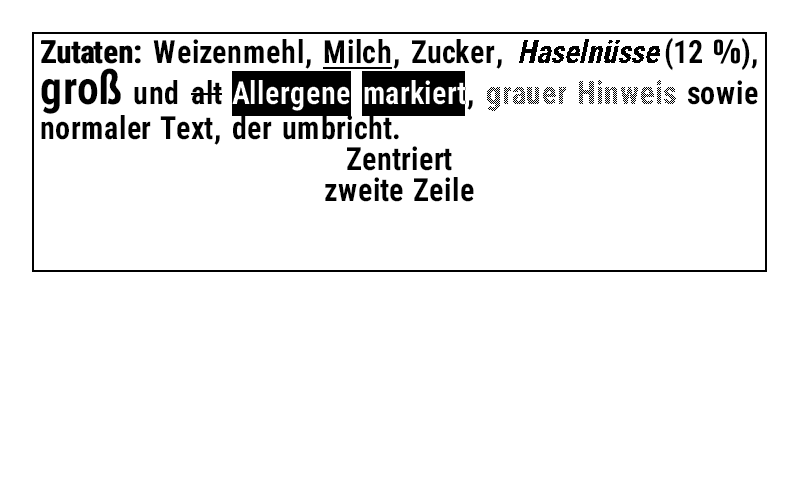
Round labels, QR code with logo & render cache
Label.Contour = LabelContour.Ellipse describes round or oval stock (the ellipse inscribed in width × height): previews (Render, LabelBinding.Render/RenderPdf, HTML, sheets) tint the area outside it and draw the outline (also ZplRenderSettings.LabelContour for any ZPL), Validate() reports every item whose ink leaves the ellipse; the printed ZPL does not change. BarcodeItem.LogoImageData (PNG/JPEG/SVG), LogoSizePercent (5–30, default 20) and LogoPosition put a logo into a QR code and keep it native: ^BQ with error correction H, a white ^GB box of whole modules on the module grid (centred, or between the finder patterns at the top/bottom) and the logo as a small ^GFA inside – ZXing reads the code in every orientation. A bound QR code with logo is sent with each record of a stored format. LabelBinding.Render/RenderPdf rasterise the leading items that are the same on every label (up to the first one that varies) once per job and draw every label over that image – pixel for pixel the same result; on a label with a large static photo layer rasterising went from 5.1 to 1.3 ms per label (PNG encoding comes on top).
var label = new Label(LabelUnit.Mm, 50, 50) { Contour = LabelContour.Ellipse };   // round label
label.Add(new BarcodeItem
{
    X = 13, Y = 10, Symbology = Symbology.QrCode, DataField = "Url", BarHeight = 4,
    LogoImageData = logoPng, LogoSizePercent = 22,   // ^BQ native (error correction H) + ^GB + small ^GFA
});
IReadOnlyList<string> errors = label.Validate();    // reports items outside the ellipse
var pngs = label.For<IReadOnlyDictionary<string, object?>>()
    .Render(records).ToList();                     // static layer rasterised once, outline in the preview