


05EPL2
EplRenderer is a virtual EPL2 printer: EPL is translated to ZPL and rendered by the same ZplRenderer – same fonts, barcodes, output formats and settings. ToZpl() returns the translation directly, i.e. an EPL→ZPL converter for migrating legacy forms.
Try it online on zplCloud.com: EPL2 to ZPL
var epl = new EplRenderer(new ZplRenderSettings { Dpi = 203 }.WithLabelSizeInches(4, 3));
epl.Clock = () => new DateTime(2026, 10, 18, 14, 5, 9);      // for TT/TD fields
epl.PrinterControl += (_, e) => Console.WriteLine($"EPL-Steuerbefehl: {e.Command.Name}");

List<byte[]> pngs = epl.ProcessFile("samples/zpl/sample.epl");   // one PNG per printed label
File.WriteAllBytes("sample.png", pngs[0]);

// EPL → ZPL: the same translation the renderer uses internally
string zpl = epl.ToZpl(File.ReadAllText("samples/zpl/form.epl"));
File.WriteAllText("form.zpl", zpl);                              // three ^XA…^XZ blocks (P3)

epl.AddGraphic("LOGO", File.ReadAllBytes("logo.pcx"));          // for GG x,y,"LOGO"
epl.Settings.OutputFormat = ZplOutputFormat.Pdf;
File.WriteAllBytes("form.pdf", epl.ProcessFile("samples/zpl/form.epl")[0]);
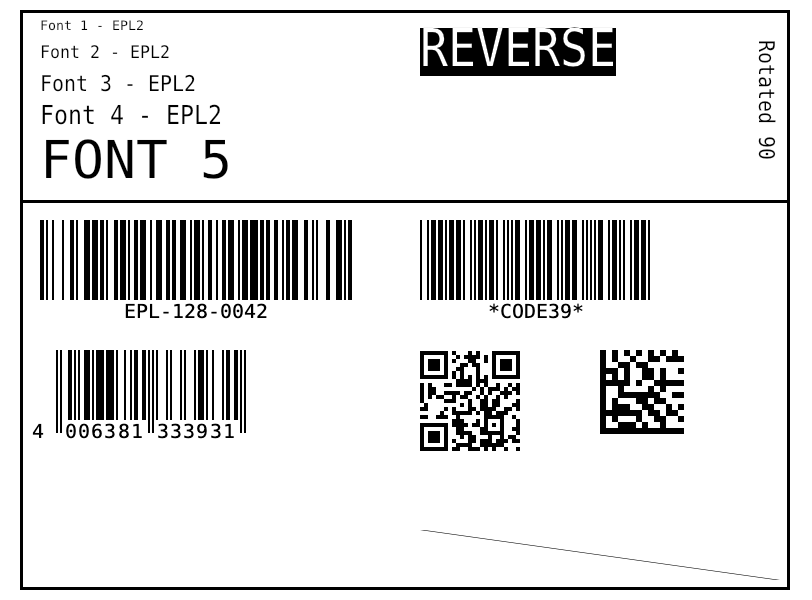
samples/zpl/sample.epl EPL → image
Show translated ZPL (ToZpl)
Forms, variables & counters
FS"name" … FE records a form, FR"name" recalls it. V00–V99 are variables, C0–C9 counters (with step size and fixed length); the data follows after ?, one line each. P3 prints three labels and increments C0 each time. As on the printer, the form remains in memory.
Translated ZPL


Supported EPL2 commands
| Command | Meaning |
|---|---|
N | Clear image buffer |
q / Q | Label width / height and gap |
R | Reference point (shift origin) |
ZT / ZB | Print direction top / bottom (ZB = 180°) |
A | Text: resident fonts 1–5 (203/300 dpi), rotation, magnification, N/R (reverse) |
B | 1D barcodes: Code 128 (A/B/C/Auto), Code 39, Code 93, EAN/UPC, I2of5, Codabar, MSI, Plessey, POSTNET … |
b | 2D barcodes: QR (Q), Data Matrix (D), PDF417 (P), MaxiCode (M), Aztec (A) |
X | Rectangle (box) |
LO / LW / LE | Line black / white / XOR |
LS | Diagonal |
GW | Direct graphic (binary) |
GM / GG / GK | Store / print / delete PCX graphic |
FS … FE | Record form |
FR / FK | Recall / delete form |
V | Form variable (length, justification, prompt) |
C | Counter (length, justification, step ±) |
? | Variable data for V and C |
P | Print (number of sets), increments counters |
TS / TT / TD | Set clock, time and date fields |
S D I O U JF JB W … | Speed, density, character set, options: reported via PrinterControl |
Control commands without effect on the image (
S, D, I, O, U, JF …) raise EplRenderer.PrinterControl. TT/TD use Clock, TS sets an offset. PCX graphics for GG come via GM or AddGraphic(name, pcx).