ZPL optimizer
ZplOptimizer.Optimize shrinks ZPL without changing a single pixel (verified on the entire Labelary corpus): Safe removes redundant state commands (^BY, ^CF …), Aggressive additionally removes line breaks and default parameters and recompresses graphics (GraphicCompression Hex/ACS/Z64). Field data is left untouched; with ^CC/^CT the input is returned unchanged. In the label model: Label.Optimization.
string safe = ZplOptimizer.Optimize(zpl, ZplOptimization.Safe);              // remove duplicate ^BY/^CF/...
string small = ZplOptimizer.Optimize(zpl, ZplOptimization.Aggressive,        // + line breaks, default parameters
    GraphicCompression.Z64);                                                 // + recompress graphics

label.Optimization = ZplOptimization.Aggressive;     // applies to ToZpl and data binding
label.GraphicCompression = GraphicCompression.Z64;
ZPL formatter & ZPL diff
ZplFormatter.Format (= ZplDocument.Parse(zpl).ToZpl(new ZplOutputOptions { PrettyPrint = true })) writes one command per line and indents label contents and field blocks (^FO/^FT … ^FS), optionally with an ^FX comment per field; ZplFormatter.Minify removes whitespace and comments. Field data (^FD/^FV), ^FH escapes and ~DG/^GF payloads are kept byte for byte and no line break is ever inserted after field data – the output yields the same commands and renders pixel-identically (tested on the entire sample and Labelary corpus). ZplDiff.Compare renders two versions and returns per label an overlay PNG (red removed, green added, grey unchanged), the number of changed pixels, bounding boxes of the changes and a line diff of the formatted sources. Command line: zplcore format and zplcore diff.
string pretty = ZplFormatter.Format(zpl);                    // one command per line, field blocks indented
string commented = ZplFormatter.Format(zpl, new ZplOutputOptions
{
    PrettyPrint = true, Indent = 4, AddComments = true,      // ^FX comment per field (text, barcode, box …)
});
string minified = ZplFormatter.Minify(zpl);                  // no whitespace between commands, no ^FX
string viaModel = ZplDocument.Parse(zpl).ToZpl(ZplOutputOptions.Pretty);

var diff = ZplDiff.Compare(zpl, zplNew, new ZplRenderSettings { Dpi = 203 });
foreach (var l in diff.Labels)                               // red = removed, green = added, grey = unchanged
    File.WriteAllBytes($"diff-{l.Index + 1}.png", l.OverlayPng!);
Console.WriteLine($"{diff.ChangedPixels} Pixel geändert, Regionen: {diff.Labels[0].Regions.Count}");
foreach (var d in diff.TextDiff.Where(d => d.Kind != ZplDiffLineKind.Unchanged))
    Console.WriteLine((d.Kind == ZplDiffLineKind.Added ? "+ " : "- ") + d.Text);
Try it online on zplCloud.com: ZPL Formatter · ZPL Diff
Font download, renaming stored objects & elements as JSON
Label.FontDownloadZpl() returns only the ~DY/~DU commands of the label fonts, FontManager.Convert turns any TTF into a download command, and Label.FontAsGraphicThreshold sends large fonts as a graphic instead. The ZplResourceStore can rename graphics, formats and fonts and cache decoded graphics. ZplRenderResult.RenderedElementsAsJson() outputs the traced elements with type, data, bounds, rotation and source position.
var label = new Label(LabelUnit.Mm, 50, 20).AddFont("MYFONT.TTF", ttf);
label.Add(new TextItem { Text = "Hallo", Font = "E:MYFONT.TTF" });
string fonts = label.FontDownloadZpl();                         // only ~DY…, sent to the printer once
string du = label.FontDownloadZpl(FontDownloadCommand.DU);
string raw = FontManager.Convert(ttf, "R:OTHER", FontDownloadCommand.DU); // any TTF → ZPL
label.FontAsGraphicThreshold = 512 * 1024;                     // larger fonts as ^GFA graphic
var r = new ZplRenderer();
r.Render("~DGR:OLD.GRF,8,1,FFFFFFFFFFFFFFFF");
r.Store.RenameGraphic("OLD", "E:LOGO.GRF");
r.Store.RenameFormat("A", "C");
r.Store.RenameFont("E:F1.TTF", "F2.TTF");
r.Store.CacheGraphics = true; // reuse decoded ^GF graphics
int cached = r.Store.CachedGraphicCount;var renderer = new ZplRenderer(new ZplRenderSettings { TraceElements = true });
foreach (var res in renderer.Render(zpl))
{
// [{"type":"A","data":"Hi","bounds":{"x":..},"rotation":90,"sourceOffset":..,"sourceLength":..}, ...]
string json = res.RenderedElementsAsJson(indented: true);
res.Bitmap.Dispose();
}
15ZPL object model
ZplDocument.Parse splits ZPL into ZplFormats with typed commands – one subclass of ZplCommandBase per ZPL command (FieldOriginCommand, Code128Command, Pdf417Command …, unknown ones as UnknownCommand). Change properties, and ToString() writes ZPL again. ZplBuilder builds formats fluently.
// typed object model: parse, modify, write back
ZplDocument doc = ZplDocument.Parse(zplIn);
foreach (ZplFormat format in doc.LabelFormats)
{
    foreach (FieldOriginCommand fo in format.OfType<FieldOriginCommand>())
        fo.X += 20;                                       // everything 20 dots to the right
    foreach (Code128Command bc in format.OfType<Code128Command>())
        bc.Height = 60;
}
string moved = doc.ToString();

// or from scratch with the ZplBuilder
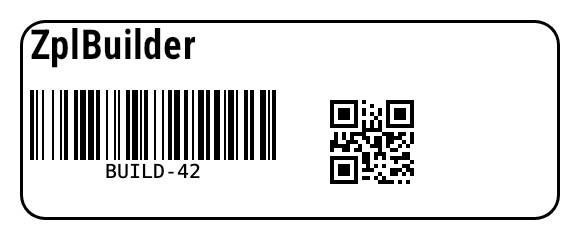
string zpl = new ZplBuilder()
    .Format(f => f
        .Encoding(28)
        .Text(30, 30, "ZplBuilder", height: 40)
        .FieldOrigin(30, 90).BarcodeDefaults(2, height: 70).Code128().FieldData("BUILD-42")
        .FieldOrigin(330, 30).QrCode(magnification: 4).FieldData("QA,ZplDocument")
        .FieldOrigin(20, 20).GraphicBox(540, 200, 3, rounding: 2).FieldSeparator())
    .ToString();
ZplBuilder output