


AI & automationMCP
Your AI agent designs, checks and fixes labels on its own
With the MCP server zplcore-mcp, AI agents such as Claude Code, Claude Desktop, GitHub Copilot in VS Code and Cursor work directly with the zplCore engine: write ZPL, render it, read the report, fix it, until the label is right. Offline, on your machine, through the Model Context Protocol.
Create a 100 × 150 mm GS1 shipping label for this shipment and check it against the GS1 logistics rules.
lint0 diagnosticscomplygs1-logistic2 errors · 11 notesZPL3104 SSCC: X-dimension 0.375 mm < 0.495 mm · ZPL3105 bar height 13 mm < 31.75 mm- Agent: SSCC barcode set to
^BY4and 270 dots high, text 3 mm and up, layout adjusted. complygs1-logistic0 errors · 0 warnings · 0 notesverify3 of 3 barcodes read · grade ArenderPNG · 100 × 150 mm · 203 dpi
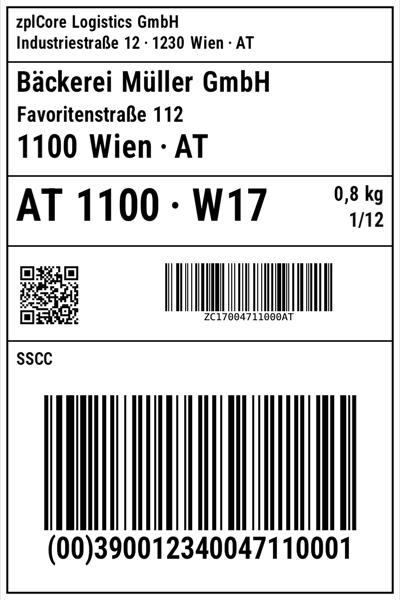
Done.
0 errors · all barcodes grade A
26tools
stdiono network port
offlineno cloud service
26 tools for agents
Create
renderfill_templateformatconvert_eplimport_labellift_svg
Check & simulate
lintdiffcomplyverifyprinter_profilesprinter_checkprint_estimatecut_plan
Data, GS1 & RFID
extractredactgs1_link_buildgs1_link_parsegs1_migraterfid_encoderfid_decoderfid_check
Look up
list_symbologiesdescribe_symbologyexplain_commandget_limits
Works with
- Claude Code
- Claude Desktop
- VS Code · GitHub Copilot
- Cursor
Built for untrusted input
- stdio only, no network port; every call runs in its own worker process with time and memory limits
- No access to files, network, shell or environment variables; on macOS also inside the
sandbox-execsandbox - Text from the label is marked as untrusted data; hardened with adversarial and fuzz tests
- Automation without AI: the same checks in CI with
zplcore checkand the GitHub Action
# Claude Code: add the server to the current project
claude mcp add zplcore -- zplcore-mcp
zplcore-mcp ships with the SDK as a dotnet tool (.NET 10). Installation and the setup for Claude Desktop, VS Code and Cursor are in the docs.